
Automated SMS and Voice Calls using Telnyx Api

The Automated SMS and Voice Calls solution leverages the Telnyx API to empower businesses with a seamless and robust communication platform. Designed for reliability, scalability, and ease of integration, this solution allows businesses to enhance customer engagement, streamline communication workflows, and ensure secure user interactions through automated messaging and voice call services.

Key Features

  1. Telnyx SMS API Integration
    • Automate the process of sending SMS messages for a variety of use cases, including notifications, updates, and promotions.
    • Deliver messages globally with high reliability and low latency, ensuring effective and timely communication.
  2. Telnyx Voice API Integration
    • Automate voice call communications for tasks like delivering personalized messages, reminders, or alerts.
    • Utilize text-to-speech functionality to generate dynamic, real-time voice messages tailored to customer needs.
  3. Secure OTP Authentication
    • Implement One-Time Password (OTP) verification for secure user identification.
    • Send OTPs via SMS or voice call, ensuring flexibility and reliability in multi-factor authentication processes.
    • Strengthen the security of user accounts while offering a smooth and user-friendly experience.
  4. Automated Reminders and Alerts
    • Schedule and send automated SMS and voice call reminders for appointments, events, or important deadlines.
    • Deliver timely alerts to customers, such as status updates, emergency notifications, or delivery confirmations.
    • Enhance customer satisfaction by ensuring critical information reaches them without delay.
  5.  Global Reach with Localized Numbers
    • Use Telnyx’s extensive network to send SMS and voice calls to customers worldwide.
    • Opt for local or toll-free numbers to improve customer trust and engagement.
  6. Ease of Integration
    • Built for developers, the Telnyx API offers comprehensive documentation, sample code, and SDKs to simplify implementation.
    • Quickly integrate the API into existing systems, mobile apps, or web platforms, enabling rapid deployment.
  7. Cost-Effective Scalability
    • Scale your communication processes effortlessly as your business grows.
    • Take advantage of Telnyx’s pay-as-you-go model for cost-efficient usage tailored to your business needs.

Benefits

  • Enhanced Customer Engagement: Stay connected with your audience through personalized and timely SMS and voice communications.
  • Improved Security: Protect user accounts with secure and reliable OTP authentication.
  • Operational Efficiency: Automate routine communication tasks, reducing manual effort and freeing up resources for other priorities.
  • Better Time Management: Ensure customers never miss an important update or deadline with automated reminders and alerts.
  • Global Flexibility: Reach customers worldwide with localized communication options for a personal touch.

This solution is ideal for businesses across industries, from e-commerce to healthcare, financial services, and more. Whether you need to verify users, send appointment reminders, or deliver real-time alerts, the Automated SMS and Voice Calls platform powered by Telnyx API provides a comprehensive and scalable communication toolkit to meet your needs.


Smart Traffic Exchange Website

A Smart Traffic Exchange Website, built on the Surfow platform, is an innovative system designed to help users increase legitimate traffic to their websites through a collaborative traffic exchange network. This solution is ideal for individuals and businesses aiming to enhance their online visibility and reach a broader audience.

Key Features

  1. Traffic Exchange System
    • Users submit their websites to the platform, making them eligible for viewing by other members.
    • By participating in the exchange, members earn credits through site visits, which can be redeemed to have their own websites viewed by others.
  2.  User Registration and Submission
    • Upon registration, users can quickly and easily submit their websites to the exchange program.
    • Submitted sites are displayed to other members, ensuring a continuous flow of legitimate visitors.
  3. Credit-Based Engagement
    • Earn credits by viewing and interacting with other members’ websites.
    • Credits earned are used to promote the user’s own website within the network, ensuring a fair and reciprocal system.
  4. Automated Traffic Distribution
    • The platform automatically manages the distribution of traffic based on the credits earned by users.
    • This ensures that all participants receive an equitable share of visitors, boosting exposure consistently.
  5. Legitimate and Quality Traffic
    • The system encourages genuine engagement by requiring users to actively view other websites, avoiding fraudulent or bot traffic.
    • This enhances the credibility and quality of the traffic generated through the platform.
  6. User-Friendly Interface
    • A clean and intuitive dashboard allows users to track their credits, submitted websites, and incoming traffic.
    • Simplified workflows ensure that users can focus on growing their website’s traffic without technical hurdles.

Benefits

  • Increased Website Exposure: Gain more visibility for your website by leveraging the network of exchange participants.
  • Legitimate Traffic Growth: Drive real users to your site, improving overall engagement metrics and reducing bounce rates.
  • Cost-Effective Solution: Boost website traffic without significant financial investment, ideal for small businesses or startups.
  • Community-Driven Engagement: Join a cooperative network where mutual participation benefits all members.
  • Scalability: Grow your traffic proportionally as you engage more with the exchange system.

How It Works

  1. Register and Submit: Create an account and register your website on the platform.
  2. Earn Credits: Browse and interact with other members’ websites to accumulate credits.
  3. Redeem Credits: Use earned credits to promote your website, making it visible to other members of the network.
  4. Receive Traffic: Watch as your site receives increased visits from other engaged users.

Ideal Use Cases

  • Small Businesses: Looking to gain traction and online presence without significant advertising costs.
  • Content Creators: Bloggers, YouTubers, or affiliates aiming to expand their audience.
  • E-Commerce Stores: New or smaller stores seeking to boost website visits and potential conversions.With its fair and cooperative exchange mechanism, the Smart Traffic Exchange Website powered by Surfow offers an efficient, community-driven solution to growing legitimate traffic. By engaging with this platform, users can expand their reach, improve their site’s visibility, and achieve sustainable growth.

2024-11-29T07:30:00+00:00Categories: Business Website, Integrations|Tags: , , , , |

Shopify Import App and Inventory Management

The Shopify Import App and Inventory Management software allows businesses to import products from various eCommerce warehouses into a single Shopify store. This software automates the process of product importation, as well as stock and order updates, ensuring seamless integration between the Shopify store and multiple eCommerce platforms. The solution includes a Shopify app for importing products from platforms like Magento, SolidCommerce, and others, and an inventory management panel for managing and updating the imported products. The system uses the Shopify API to facilitate smooth synchronization of data, including dynamic pricing features and integration with eCommerce fulfillment systems like ShipStation.

Key Features

  • Product Import from Multiple Warehouses: The app supports importing products from various eCommerce platforms such as Magento, SolidCommerce, and more into a single Shopify store.
  • Inventory Management Panel: A dedicated panel allows users to manage and track imported products, ensuring accurate stock levels and product details in the Shopify store.
  • Dynamic Pricing Feature: Users can set dynamic pricing to adjust product prices by a fixed value or a percentage when imported into Shopify, offering flexible pricing strategies.
  • Regular Stock and Order Updates: The system automatically updates stock levels and order details back to the source eCommerce warehouses or fulfillment systems like ShipStation at regular intervals.
  • Shopify API Integration: Seamless integration with Shopify’s API ensures real-time synchronization of products, stock, and orders, improving operational efficiency.

Benefits

  • Streamlined Product Importation: The app simplifies the process of importing products from various eCommerce platforms, saving time and reducing manual effort.
  • Efficient Inventory Management: The inventory management panel provides businesses with an easy way to manage and update their product listings, ensuring accurate stock information across all platforms.
  • Flexible Pricing Control: The dynamic pricing feature allows businesses to adjust product prices automatically, improving profitability and adapting to market conditions.
  • Seamless Integration with Fulfillment Systems: Regular updates to stock and order details ensure that both the Shopify store and eCommerce warehouses are always in sync, improving order fulfillment accuracy.
  • Time Savings and Accuracy: The automated data synchronization reduces errors and saves time for businesses by eliminating manual updates and reducing the chances of stock discrepancies.
  • Scalability: The app is designed to support growth, making it easy for businesses to add more products and warehouses as they expand.

WordPress Livechat Plugin

The WordPress Livechat Plugin enables live chat functionality on websites, allowing businesses to interact with visitors in real-time. The plugin supports multiple chat operators and simultaneous chat sessions, ensuring efficient customer support. It includes a control panel integrated into the WordPress Administrator dashboard, where operators can be managed, chat history can be reviewed, reports can be generated, and documents uploaded by users during chats can be accessed. Additionally, the plugin offers a billing system that allows businesses to track and charge operators based on the time spent handling chat sessions.

Key Features

  • Multiple Chat Operators: The plugin supports multiple operators handling multiple chats simultaneously, improving customer support efficiency.
  • Integrated Control Panel: A user-friendly control panel within the WordPress Admin dashboard enables easy management of operators, chat history, and reports.
  • Chat History & Reports: Access to detailed chat history and reports, allowing businesses to track customer interactions and performance.
  • Document Uploads: Users can upload documents during chat sessions, which can be easily accessed by operators for review or support purposes.
  • Operator Billing: A built-in billing system to track operator activity and calculate billing based on the time spent on chats, ensuring accurate compensation.
  • Real-Time Chat: Provides a seamless live chat experience for real-time communication between visitors and support agents.

Benefits

  • Enhanced Customer Support: Multiple operators and simultaneous chat sessions allow businesses to provide faster, more efficient support to website visitors.
  • Easy Management: The integrated control panel simplifies operator management, chat history tracking, and performance monitoring within the WordPress dashboard.
  • Improved Data Tracking: Chat history and reports help businesses review interactions, identify trends, and optimize support processes.
  • Convenient Document Sharing: The ability for users to upload documents during chats ensures that issues can be resolved more effectively with relevant files.
  • Accurate Billing: The operator billing feature allows businesses to accurately track and charge operators based on their chat time, ensuring fair compensation.
  • Increased Engagement: Real-time communication helps build stronger relationships with website visitors, enhancing customer satisfaction and boosting conversion rates.

Automated SMS and Voice Calls using Plivo Api

A custom plugin was developed for CRM platforms to enable SMS and voice call functionality via the Plivo API. This plugin integrates both the Plivo SMS API and Plivo Voice API, allowing businesses to send SMS and voice call reminders, alerts, and OTP verifications. With this solution, phone numbers can be verified through OTP authentication, and automated notifications can be sent to enhance customer engagement and communication.

Key Features

  • Plivo SMS API Integration: The plugin utilizes the Plivo SMS API to send automated SMS notifications, such as reminders and alerts, to customers.
  • Plivo Voice API Integration: The plugin also integrates the Plivo Voice API, enabling businesses to send voice call reminders and alerts, improving customer engagement.
  • OTP Phone Number Verification: The plugin allows phone number verification via One-Time Password (OTP) authentication, ensuring secure and reliable customer communication.
  • Automated Reminders & Alerts: Businesses can automate the sending of reminders and alerts to customers, improving operational efficiency and customer service.
  • Seamless CRM Integration: The plugin works smoothly with CRM platforms, offering easy integration for businesses looking to enhance their communication channels.

Benefits

  • Improved Communication: The integration of SMS and voice call notifications allows businesses to stay connected with customers, ensuring timely reminders and alerts.
  • Enhanced Security: OTP authentication ensures that phone numbers are verified securely, reducing the risk of fraud and enhancing data accuracy.
  • Increased Efficiency: Automating reminders and alerts saves time and reduces manual effort, allowing businesses to focus on other core operations.
  • Better Customer Engagement: With the ability to send SMS and voice calls, businesses can engage customers more effectively, improving overall satisfaction and loyalty.
  • Scalability: The Plivo API supports high-volume messaging and voice calls, making it easy for businesses to scale communication efforts as needed.

2024-12-17T06:52:37+00:00Categories: Ecommerce Application|Tags: , , , , , |

WHM Analysis/audit plugin

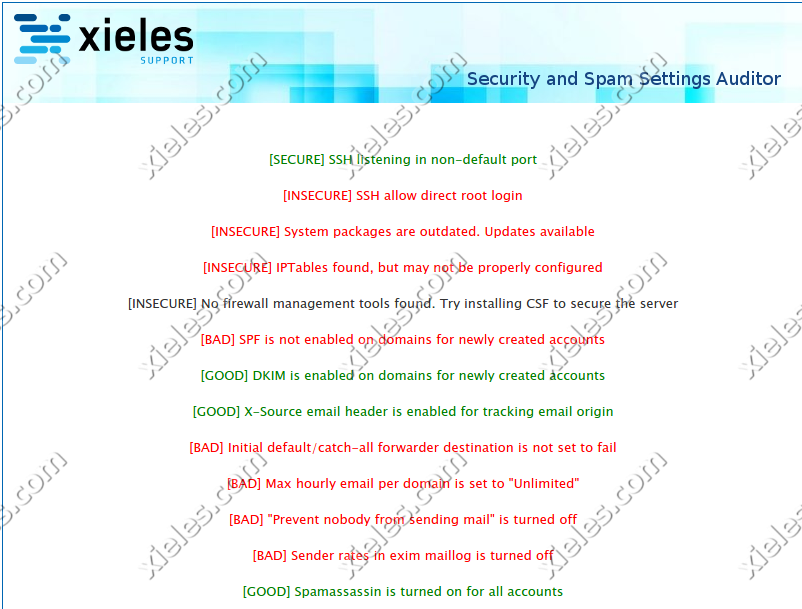
The WHM Analysis/Audit Plugin involves the development of a WHM plugin designed to perform automated security analysis and audits of server configurations. The plugin allows administrators to assess the security posture of their servers by conducting thorough checks across multiple critical areas, such as SSH hardening, OS updates, firewall settings, Tweak settings, Exim configurations, and other essential security configurations. By simply clicking a button, the plugin performs a comprehensive audit, identifying potential vulnerabilities, misconfigurations, and areas that require attention.

The primary goal of this plugin is to provide web hosting administrators with an easy-to-use tool that helps ensure servers are securely configured, follow best practices, and comply with industry-standard security protocols. This can significantly reduce the risk of cyberattacks and unauthorized access, while simplifying the process of maintaining a secure hosting environment.

Key Features and Functionality:

  1. One-Click Security Audit:
    • Automated Security Scanning: With a single click of a button, the plugin scans the server for common security issues and misconfigurations. This eliminates the need for manual inspection and ensures a consistent, repeatable process to assess security.
    • Comprehensive Security Checks: The plugin checks a wide range of system components, including critical security settings, configurations, and services. These include SSH configuration, OS-level updates, firewall rules, and other key areas of server security.
  2. SSH Hardening Check:
    • SSH Configuration Review: SSH (Secure Shell) is often the primary method for accessing a server, making it a critical point for security. The plugin audits the SSH configuration to ensure that hardening best practices are in place, such as:
  3. OS Update Compliance:
    • Check for Pending OS Updates: The plugin performs a check for any missing operating system updates, ensuring that the server is up-to-date with the latest patches and security fixes. Missing patches can leave a server exposed to vulnerabilities that hackers can exploit.
  4. Firewall Configuration Check:
    • Review Firewall Rules: The plugin audits the server’s firewall settings, ensuring that appropriate rules are in place to block unauthorized traffic while allowing legitimate access. Key areas covered include:
  5. Tweak Settings Audit:
    • Check for Tweak Settings Misconfigurations: WHM provides several “Tweak Settings” that control the server’s behavior and security. The plugin audits these settings to ensure they are properly configured for maximum security.
  6. Exim Configuration Audit:
    • Exim Security Settings: Exim is a widely used mail transfer agent (MTA) on cPanel/WHM servers. The plugin reviews the Exim configuration for common security issues

Key Benefits of the WHM Security Analysis/Audit Plugin:

1. Improved Security Posture:

By automating the process of reviewing critical server configurations, the plugin helps ensure that your server is securely configured and follows security best practices. Regular audits reduce the risk of attacks that exploit common server misconfigurations.

2. Time and Effort Savings:

Manually auditing a server’s security configuration can be a complex and time-consuming task. This plugin automates the entire process, saving administrators significant time and effort by providing a simple, one-click solution to perform comprehensive security checks.

3. Proactive Vulnerability Management:

By continuously monitoring and checking for security gaps, the plugin allows administrators to identify potential issues before they become serious security breaches. This proactive approach is key to maintaining a secure hosting environment.

4. Customizable Alerts and Reports:

Administrators can receive real-time alerts and detailed audit reports, which help keep them informed about the server’s security status and any necessary actions. These reports can be scheduled regularly, ensuring that security audits are always up to date.

5. Ease of Use:

The plugin’s one-click operation simplifies the auditing process for both experienced administrators and those less familiar with server security. The user-friendly interface and automated checks make it accessible for users of all technical levels.

6. Comprehensive Security Coverage:

The plugin covers multiple critical security areas, such as SSH hardening, OS updates, firewall settings, Exim configurations, and WHM tweak settings. This ensures a holistic approach to security and minimizes the risk of overlooking important server hardening tasks.

Technology Stack:

  • WHM API: The plugin interfaces with WHM’s API to perform security audits across various system components and configurations.
  • PHP: The primary language used for scripting the plugin’s logic and managing server-side operations.
  • cPanel/WHM Configuration Files: The plugin accesses configuration files such as /etc/ssh/sshd_config, /etc/exim.conf, and other system files for auditing purposes.
  • Bash/Shell Scripting: Shell scripts are used to perform security scans and checks on the server, such as validating firewall rules, checking SSH configurations, and verifying OS-level updates.
Screenshots

2025-11-05T05:23:37+00:00Categories: Module Development, Plugin Development|Tags: , , , |

WHMCS UpCloud Cloud Server Provisioning Module

The WHMCS UpCloud Cloud Server Provisioning Module involves the development of a custom WHMCS module designed to integrate with UpCloud, a leading cloud service provider. The module allows seamless provisioning and management of cloud servers directly from the WHMCS platform. It provides administrators and clients with the ability to perform essential server operations like starting, restarting, suspending, and terminating cloud servers without leaving the WHMCS interface. This integration streamlines the process of cloud server management, providing a unified and efficient solution for businesses using UpCloud’s infrastructure services.

The module automates key provisioning tasks, reduces administrative overhead, and enhances user experience by simplifying cloud server management. Whether used by administrators to manage customer accounts or by clients for self-service, this module helps in automating many aspects of cloud server hosting.

Key Features and Functionality:

  1. Cloud Server Provisioning:
    • Automatic Server Deployment: The module allows for automatic provisioning of cloud servers once an order is placed in WHMCS. When a customer purchases a server from UpCloud, the module communicates with the UpCloud API to provision the server in real-time, creating an instance that matches the specifications selected by the customer.
    • Customization Options: Clients can choose from a range of server configurations such as CPU, memory, storage size, and operating system when placing their order. This ensures that the provisioned cloud server meets their specific needs.
    • Server Instance Management: Once the server is provisioned, the module allows both admins and clients to view server details such as IP address, resources (CPU, RAM, Storage), operating system, and server status directly from the WHMCS dashboard.
  2. Start/Stop/Restart Servers:
    • Start Server: Clients and administrators can easily start their cloud server from the WHMCS client panel. This is particularly useful when a server has been powered down for maintenance or after a period of inactivity.
    • Stop Server: Similarly, users can shut down their cloud server, which can be useful for cost-saving measures (as some cloud providers charge based on uptime) or when the server is not in use.
    • Restart Server: The module allows users to restart their cloud servers directly from the WHMCS interface. This can be useful for troubleshooting, applying system updates, or resolving performance issues without needing to manually log into the UpCloud dashboard.
  3. Suspend/Terminate Servers:
    • Suspend Server: The module includes the option to suspend a server, which means temporarily halting its operation without deleting the instance. This option is especially useful for account management, such as when a user needs to pause services due to billing issues or during maintenance.
    • Terminate Server: For a permanent shutdown, the terminate feature allows both admins and clients to fully delete a server instance from UpCloud, freeing up any resources associated with the server. This action removes the server and all of its associated data, making it useful when a customer no longer needs the server or wishes to cancel their service.
  4. Integration with UpCloud API:
    • Real-Time Communication with UpCloud: The module communicates in real-time with UpCloud’s API, ensuring that all operations, such as provisioning servers, starting, stopping, and restarting, are executed promptly. This ensures minimal latency and a smooth user experience when performing these actions from within WHMCS.
    • Automatic Resource Allocation: When provisioning new cloud servers, the module ensures that resources like CPU, RAM, storage, and IP addresses are allocated dynamically based on the client’s preferences and the available resources on UpCloud.
  5. User-Friendly Client Panel:
    • Intuitive Dashboard: The client panel provides a simple and intuitive interface for users to manage their servers without needing to understand the complexities of cloud hosting. Clients can easily view their server details, including performance metrics, and control their server instance (start, stop, restart, etc.) from a centralized dashboard.
    • Easy-to-Use Interface: The interface is designed with ease of use in mind, allowing users to quickly navigate between server management actions and view critical server information like CPU usage, storage space, and uptime.

Admin Panel Features:

The admin panel gives administrators control over the configuration of the module and user management. Administrators can:

  • Configure Server Types: Admins can define server templates, including various specifications for CPU, memory, storage, and OS, which clients can select during the order process.
  • Monitor Resource Usage: Admins can monitor the usage statistics of all cloud servers, such as CPU utilization, memory usage, and storage allocation, ensuring optimal resource distribution.
  • Provision Servers: Administrators can also manually provision servers through the admin panel, allowing them to handle special requests or troubleshoot issues with clients’ server instances.

Key Benefits of the WHMCS UpCloud Cloud Server Provisioning Module:

  • Streamlined Server Management: The module centralizes cloud server management within the WHMCS platform, enabling administrators and clients to perform all essential tasks (provisioning, starting, restarting, suspending, and terminating) without leaving the WHMCS interface.
  • Efficiency and Automation: The automated provisioning and management features save time and reduce errors by removing the need for manual intervention. Tasks such as starting, stopping, or restarting servers can be performed automatically based on the client’s account status or preferences.
  • Improved Customer Experience: Clients enjoy a simplified and intuitive interface for managing their cloud servers, providing them with more control and reducing the need for direct support interventions. This leads to greater customer satisfaction.
  • Cost-Effectiveness: By integrating billing, server management, and provisioning into a single platform, businesses can reduce administrative overhead and operate more efficiently, potentially lowering costs.
  • Customizable Billing Models: The module supports flexible billing cycles (e.g., hourly, monthly), ensuring that businesses can cater to a variety of client needs and ensure accurate billing based on usage.
  • Seamless Integration: By integrating directly with the UpCloud API, the module ensures that all server operations are executed seamlessly, maintaining synchronization between the cloud infrastructure and the WHMCS platform.

Technology Stack:

  • WHMCS: The billing and automation platform for provisioning, billing, and managing customer interactions.
  • UpCloud API: The communication channel between the WHMCS module and UpCloud’s cloud infrastructure, enabling real-time server provisioning and management.
  • PHP/MySQL: The technologies used to build the module, manage server data, and integrate it with WHMCS.
  • HTML/CSS: Frontend technologies used to create the client-facing interface for managing cloud servers.

WHMCS cPanel Module Creation

The WHMCS cPanel Module Creation involves the development of a WHMCS module designed to manage cPanel accounts directly from the WHMCS platform. The module consists of two main components: the admin panel, where module settings can be configured and managed, and the client panel, where end-users can perform various cPanel-related tasks. The integration simplifies the process of managing hosting accounts, streamlining administrative operations while providing clients with a seamless interface for controlling and configuring their cPanel accounts.

By utilizing the module, administrators can easily control the settings and operations of cPanel hosting accounts, while clients can handle essential cPanel functions independently through their client panel. This significantly reduces the load on support teams and improves the overall user experience by providing clients with more control and autonomy.

Key Features and Functionality:

  1. List FTP Accounts:
    • FTP Account Overview: This feature allows users to view all the FTP accounts associated with their cPanel account directly from the WHMCS client panel. Clients can see details such as the username, directory path, and the permissions associated with each account.
    • Quick Access for Management: By listing the FTP accounts, clients can easily access and manage their FTP accounts without needing to log into cPanel directly. This simplifies FTP account management and saves time for the end-user.
  2. Create/Delete FTP Accounts:
    • Create FTP Accounts: Clients can create new FTP accounts via the WHMCS client panel. This feature allows clients to assign specific usernames, set permissions, and select the root directory for the new FTP account.
    • Delete FTP Accounts: Clients can also delete existing FTP accounts, ensuring that unnecessary or obsolete FTP credentials are removed securely. This function reduces clutter and potential security risks by ensuring only active FTP accounts remain.
  3. Create/Delete Cron Jobs:
    • Create Cron Jobs: The module allows users to create and schedule cron jobs directly from the client panel. This feature helps clients automate tasks like backups, email alerts, or regular script executions on their hosting accounts.
    • Delete Cron Jobs: Clients can also delete any existing cron jobs they no longer need, providing them with full control over scheduled tasks and ensuring that they maintain only necessary processes running on their server.
  4. Backup Creation/Restore/Deletion:
    • Create Backups: The module enables clients to create backups of their cPanel accounts at any time. This feature is essential for clients who want to ensure the safety of their website and data before making significant changes or updates.
    • Restore Backups: In the event of data loss or issues, clients can easily restore backups through the client panel. This self-service backup and restore option saves time and reduces reliance on support teams.
    • Delete Backups: Clients can also delete old backups once they are no longer needed, freeing up disk space on their hosting account.
  5. Create/Delete Domain Aliases:
    • Domain Aliases Management: This feature allows clients to create and manage domain aliases directly from their WHMCS client panel. Domain aliases enable users to point multiple domain names to the same website, which is particularly useful for branding purposes.
    • Delete Domain Aliases: Clients can also delete any domain aliases that are no longer necessary, ensuring their domains and DNS settings remain organized.
  6. PHP Version Update:
    • Update PHP Version: The module allows clients to update the PHP version used by their cPanel account. Clients can select a specific version of PHP (from supported versions) and easily switch to the latest release or a required older version, ensuring their applications are running optimally with the correct PHP environment.
    • Compatibility Check: The system ensures compatibility with various PHP extensions and the server environment before updating, preventing issues related to PHP version incompatibility.
  7. Enable CDN:
    • Content Delivery Network (CDN) Integration: This feature enables clients to enable and configure CDN settings directly from the WHMCS client panel. By using a CDN, clients can improve the speed and reliability of their websites by distributing content across multiple servers worldwide.
    • Efficient Content Distribution: Enabling CDN reduces website load times and enhances user experience, particularly for websites with a global audience.
  8. Update WordPress Plugins:
    • One-Click Plugin Updates: Clients can update their WordPress plugins with a single click through the WHMCS client panel. This feature simplifies the plugin management process, ensuring that clients are always using the latest versions of their WordPress plugins for improved performance and security.
    • Automated Updates: The system can be set up to perform automatic plugin updates, ensuring clients’ websites stay secure and up-to-date with minimal effort.
  9. Update WordPress Version:
    • Update WordPress Core: This feature allows clients to update their WordPress installations directly from the WHMCS client panel. Clients can easily upgrade to the latest stable version of WordPress to benefit from security patches, new features, and improved performance.
    • Version Compatibility Checks: The module includes compatibility checks before initiating updates, ensuring that themes and plugins are compatible with the updated WordPress version.
  10. Create/Import/Export SSH Keys:
    • SSH Key Management: Clients can create, import, or export SSH keys from the client panel, providing secure, password-less access to their server via the command line.
    • Easy SSH Key Configuration: Clients can generate new SSH key pairs, import existing keys, or export keys to be used elsewhere. This makes secure server management accessible without needing to use cPanel’s native SSH key management interface.
  11. Domain Uptime Monitoring:
    • Uptime Monitoring: This feature allows clients to monitor the uptime of their domains directly from the client panel. Clients can set up alerts to notify them if their website goes offline or encounters performance issues.
    • Real-Time Monitoring: Clients receive real-time notifications about their website’s status, helping them take quick action in case of downtime, minimizing website outages and improving overall reliability.

Admin Panel Features:

The admin panel is designed to give administrators full control over the module’s settings, user permissions, and the overall management of the cPanel accounts. Admins can:

  • Configure Module Settings: Admins can define the module’s settings, including linking the WHMCS platform with cPanel, setting server parameters, and determining the level of access for clients.
  • Manage Clients and Hosting Plans: The admin panel allows the administrator to view and manage all clients using the cPanel module, including adjusting hosting plans, account status, and other details.
  • Access Logs and Reports: Admins can view logs and reports related to the module’s operations, allowing them to track changes, monitor user actions, and troubleshoot issues.

Key Benefits of the WHMCS cPanel Module:

  • Streamlined Account Management: The module simplifies the management of cPanel accounts by centralizing common tasks, allowing users to handle many actions directly from the WHMCS client panel without needing to log into cPanel.
  • Enhanced User Control: By providing clients with an intuitive interface for managing FTP accounts, cron jobs, backups, and more, this module gives users greater control over their hosting environment, reducing the need for support intervention.
  • Efficiency and Automation: Automating tasks like creating backups, updating WordPress, and managing SSH keys significantly improves operational efficiency, reducing the administrative workload.
  • Improved Client Satisfaction: With the ability to perform a wide range of cPanel tasks directly from WHMCS, clients enjoy a more seamless and efficient hosting experience. This reduces client frustration and enhances overall satisfaction.
  • Security and Control: Features like SSH key management and domain uptime monitoring add layers of security and reliability, ensuring clients can maintain secure access to their hosting account and monitor their website’s performance.
  • Time-Saving: By reducing the need for clients to log into cPanel for routine tasks, the module saves time for both clients and support teams, allowing them to focus on more complex or high-priority issues.
  • Scalability: As your hosting service grows, the module’s features can scale to accommodate additional clients and hosting accounts. The automation of routine tasks helps ensure that your business can scale efficiently without increasing administrative overhead.

Technology Stack:

  • WHMCS: The billing platform used for account management, invoicing, and automation.
  • cPanel/WHMCS API: The integration between WHMCS and cPanel using cPanel’s extensive API to manage user accounts and services.
  • PHP and MySQL: The programming languages and database used to build the module and handle user data and account management.
  • CSS/HTML: The front-end technologies used to create the user interface of both the admin and client panels.

2025-11-05T05:17:39+00:00Categories: Module Development, Plugin Development|Tags: , , , , |

Whmcs Axigen Module Creation

The WHMCS Axigen Module Creation involved the development of a custom WHMCS module designed to seamlessly integrate with the Axigen Mail Server, a popular email hosting solution. The module allows for the efficient creation and management of email accounts, domains, and other essential mail server components directly through the WHMCS platform. This integration provides both admin and end-user panels, enabling the automation of email account creation, user management, and configuration, all while ensuring smooth operation between the billing system and email hosting infrastructure.

Key Features and Functionality:

1. Admin Panel Features:

The admin panel serves as the central control hub for configuring and managing the Axigen Mail Server settings, monitoring user activities, and overseeing the entire mail hosting service. Key features include:

  • Module Settings Configuration: The admin panel allows the administrator to configure essential settings for the integration, such as server details, API credentials, and communication protocols between WHMCS and Axigen. This ensures that the integration works smoothly and securely.
  • Order Acceptance and Domain Creation: When a customer places an order for email hosting via WHMCS, the admin can accept the order, triggering an automatic process that creates the corresponding domain in the Axigen Mail Server. This feature automates the provisioning of new domains and significantly reduces manual intervention.
  • User and Account Management: The admin panel enables the management of client accounts, allowing admins to create, delete, or suspend email accounts and make necessary adjustments. This feature is particularly useful for maintaining control over the entire email hosting infrastructure.

2. User Panel Features:

The user panel is designed to give end-users (the clients) full control and autonomy over their email accounts, domains, and related settings. With this panel, clients can easily manage their email hosting services without requiring intervention from the admin. Key features include:

  • Domain Management: After placing an order, clients are able to create, modify, or delete their domains directly from the user panel. This allows clients to quickly configure new email domains for their business or personal use, without needing to contact support.
  • Account Creation and Management: Users can easily create and manage individual email accounts within their domain. This feature allows clients to add email addresses, configure user settings, change passwords, or delete email accounts when necessary.
  • Mailing List Management: Clients can create and manage mailing lists, allowing them to easily send bulk emails to a group of recipients. Mailing lists are essential for businesses that need to communicate with clients, team members, or partners. Users can create new lists, add/remove members, and configure email delivery settings.

3. Automatic Provisioning and Integration:

Automated Domain Setup: Upon order acceptance in WHMCS, the module automatically provisions the domain in the Axigen Mail Server, saving time and minimizing errors that may occur with manual setup.

Seamless Account Integration: As soon as a client creates an account in WHMCS, the module ensures that the corresponding email account is automatically provisioned in Axigen. This seamless integration ensures that the user has instant access to their new email accounts without delays.

4. Key Benefits of the WHMCS-Axigen Mail Server Module:

  • Efficiency and Automation: This module automates various tasks such as domain creation, email account management, and configuration, eliminating the need for manual intervention and improving efficiency. This reduces the time spent on account setup and allows both admins and users to manage their services with minimal effort.
  • Enhanced User Control: The user panel empowers clients by giving them full control over their domains, email accounts, groups, mailing lists, and other settings. This reduces reliance on customer support and gives clients the flexibility to manage their email services independently.
  • Scalability: The module is designed to scale as your business grows. It allows you to easily onboard new clients, add domains, and provision additional email accounts with minimal administrative work, making it suitable for businesses of all sizes.
  • Streamlined User Experience: The clean, intuitive user interface for both the admin and user panels ensures that even non-technical users can navigate the system with ease. This leads to a better overall experience for both administrators and end users.
  • Cost-Effective: By automating processes and reducing the need for manual intervention, this module helps lower operational costs for businesses that provide email hosting services. It reduces the burden on support teams and makes email management more efficient.

5. Technology Stack and Customization:

  • WHMCS: The billing and automation platform that integrates with the Axigen Mail Server to automate account creation, provisioning, and management.
  • Axigen Mail Server API: The API is used to communicate between WHMCS and Axigen, ensuring that data is synced and domains/accounts are automatically provisioned and managed.
  • PHP and MySQL: The module is built using PHP and MySQL, ensuring a fast, reliable, and scalable solution for managing email services.
  • Custom Interface Design: The admin and user panels are designed for ease of use, featuring a clean and intuitive interface that allows both administrators and clients to navigate and configure settings efficiently.

2025-11-05T05:15:51+00:00Categories: Module Development, Plugin Development|Tags: , , , |

Magento Online Store for Global networking solution

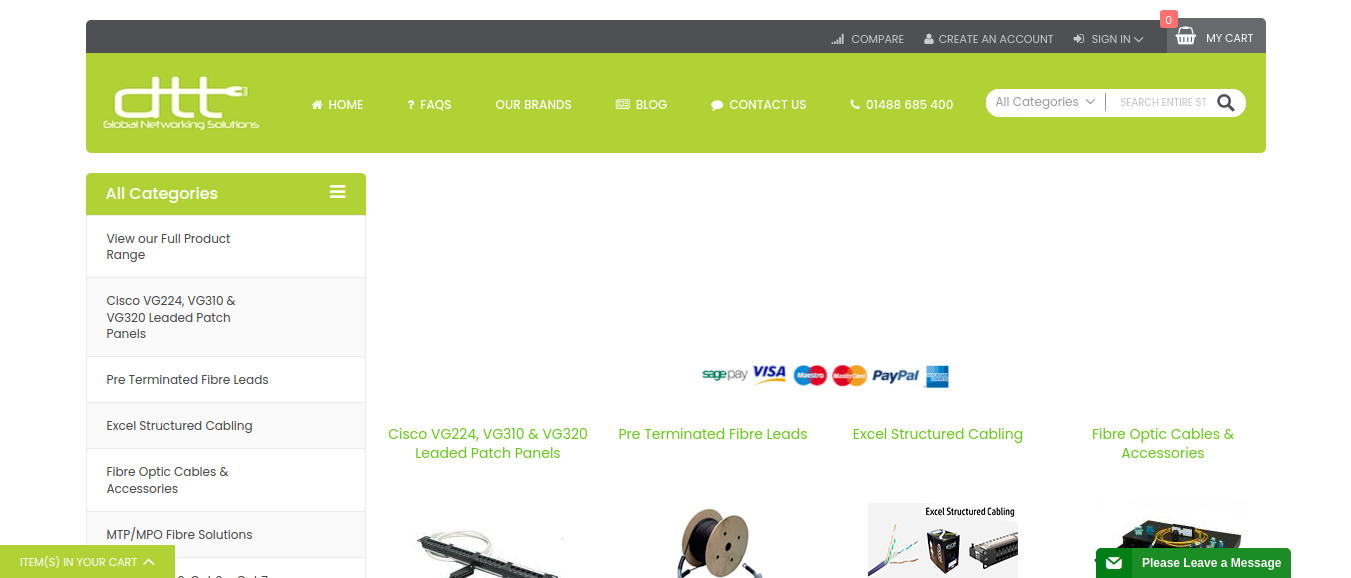
The Global Networking Solution website was developed to provide a comprehensive platform for businesses and individuals seeking advanced networking solutions. The project involved a major overhaul of the company’s existing Magento 1 website, including a full theme update and migration to Magento 2 to improve performance, security, and scalability. Additionally, ongoing maintenance and future updates were planned to ensure that the website remained up-to-date with the latest features, technologies, and security patches.

The website serves as the digital hub for showcasing the company’s services, products, and industry expertise in global networking. The goal was to enhance user experience, streamline navigation, and improve site performance while ensuring that the platform could easily scale as the business grew. The development involved working with a combination of HTML, CSS, JavaScript, PHP, and Magento technologies to meet the client’s vision and business objectives.

Key Features and Functionality:

  1. Magento 1 to Magento 2 Migration:
    • Smooth Transition: The migration from Magento 1 to Magento 2 was a critical aspect of the project. Magento 2 offers enhanced performance, better security, and more powerful features. The migration ensured that the client would benefit from the latest platform capabilities, including improved site speed, easier management, and a more robust back-end system.
    • Data Migration: We carefully handled the migration of all essential data (products, customer information, orders, and analytics) to Magento 2, ensuring no data loss or disruption in the site’s operation.
    • Upgraded Functionality: Magento 2 provides numerous enhancements, such as improved inventory management, better mobile responsiveness, a more intuitive admin interface, and better integration capabilities with third-party tools. These improvements were implemented into the site to create a better user and admin experience.
  2. Magento Theme Customization:
    • Tailored Design: The project involved updating and modifying the existing Magento theme to match the client’s specific branding and functional requirements. The goal was to ensure that the website not only reflected the company’s identity but also provided a seamless user experience for customers browsing the global networking solutions.
    • Responsive Design: The updated theme was made fully responsive, ensuring that the website is accessible and functional across all devices and screen sizes, from desktops to mobile phones.
    • Modern User Interface: We revamped the website’s visual design to make it more modern, clean, and intuitive. New design elements, navigation enhancements, and an improved layout were incorporated to make it easier for users to explore the site and find relevant information.
  3. Customization of User Experience (UX):
    • Enhanced Navigation: We restructured the navigation menu and added key categories to improve how users could explore products and services. This helped customers quickly locate the information they needed, reducing friction and improving the overall browsing experience.
    • Product Showcasing: Networking products, solutions, and services were showcased more effectively using custom Magento product templates. High-quality images, detailed descriptions, and specifications were included to help users make informed decisions.
    • Interactive Features: Interactive elements like hover effects, dynamic content, and smooth animations were integrated using JavaScript to improve engagement and make the website more visually appealing.
  4. Backend Development and PHP Integration:
    • Custom PHP Modules: To meet the specific needs of the client, custom PHP modules were developed to extend the functionality of the website. These modules integrated with the core Magento system, allowing for the customization of key features such as product catalogs, pricing models, and payment methods.
    • Payment Gateway Integration: Multiple payment methods were integrated into the website, allowing for secure online transactions. Integration with third-party payment gateways was configured to ensure smooth and seamless checkout experiences for customers across different regions.
    • Scalability: The backend was designed to be highly scalable, ensuring that the website could handle increased traffic and more product offerings as the business expanded.
  5. SEO Optimization and Site Speed Improvements:
    • SEO Best Practices: We implemented various SEO strategies to ensure that the website would rank well on search engines like Google. This included keyword optimization, updating metadata, improving URL structures, and ensuring all content was SEO-friendly.
    • Speed Optimization: Magento 2 offers significant improvements in performance, but additional optimizations were made to enhance site speed further. This included image compression, caching mechanisms, and script minification to reduce load times and provide a smoother user experience.
    • Mobile Optimization: The website was optimized for mobile performance, ensuring that users on mobile devices would experience fast loading times and smooth navigation.

Technologies Used:

  • HTML, CSS, JavaScript: For front-end development and theme customization.
  • PHP: For backend development and custom module creation.
  • MySQL: Database management for storing product, customer, and transaction data.
  • SEO Tools: For optimizing the site’s search engine rankings and improving visibility.
  • Payment Gateway Integration: To facilitate secure online transactions.

Key Benefits of the Project:

Improved Performance and Scalability:

The migration to Magento 2 greatly improved the website’s speed, performance, and scalability. The upgraded architecture ensures that the website can handle more traffic and product offerings as the business grows.

Modernized User Experience:

The updated design and improved navigation make the site easier to use and more visually appealing, which leads to a better overall customer experience.

Better Security and Compliance:

With enhanced security measures, including SSL encryption and regular security patch updates, the website is better protected against data breaches and attacks.

SEO and Mobile Optimization:

The focus on SEO and mobile optimization ensures that the website performs well in search engine rankings and provides a smooth experience for mobile users.

Easy Content Management:

The integration of a user-friendly CMS allows the client’s team to easily manage the website’s content and make updates without requiring specialized technical skills.

Screenshots

2025-11-04T11:40:44+00:00Categories: Business Website|Tags: , , , , |
Go to Top