App Development

Odoo WooCommerce Connector App

The Odoo WooCommerce Connector App is a powerful tool designed to seamlessly synchronize data between your Odoo ERP system and WooCommerce store. This integration simplifies the management of your eCommerce operations, providing a centralized platform for controlling products, customer data, and orders.


Key Features:

  1. Customer Synchronization
    Transfer and update customer information such as contact details and order history between WooCommerce and Odoo seamlessly.
  2. Products Synchronization
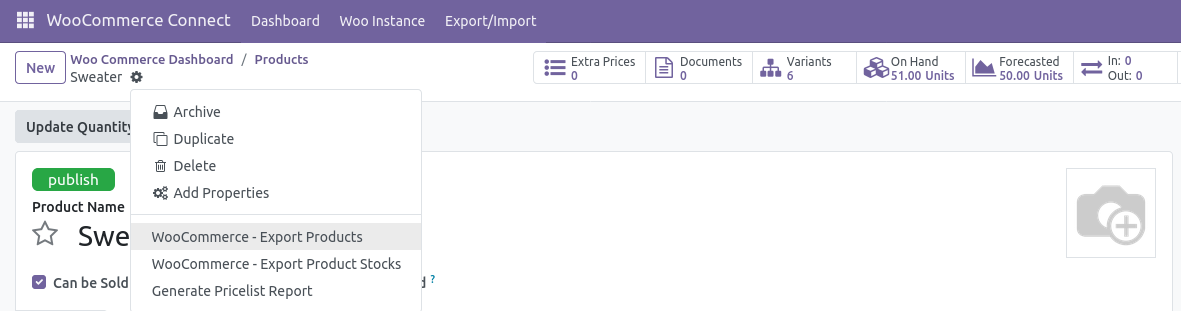
    Sync product data (e.g., price, description, stock) between WooCommerce and Odoo, ensuring both platforms remain up-to-date.
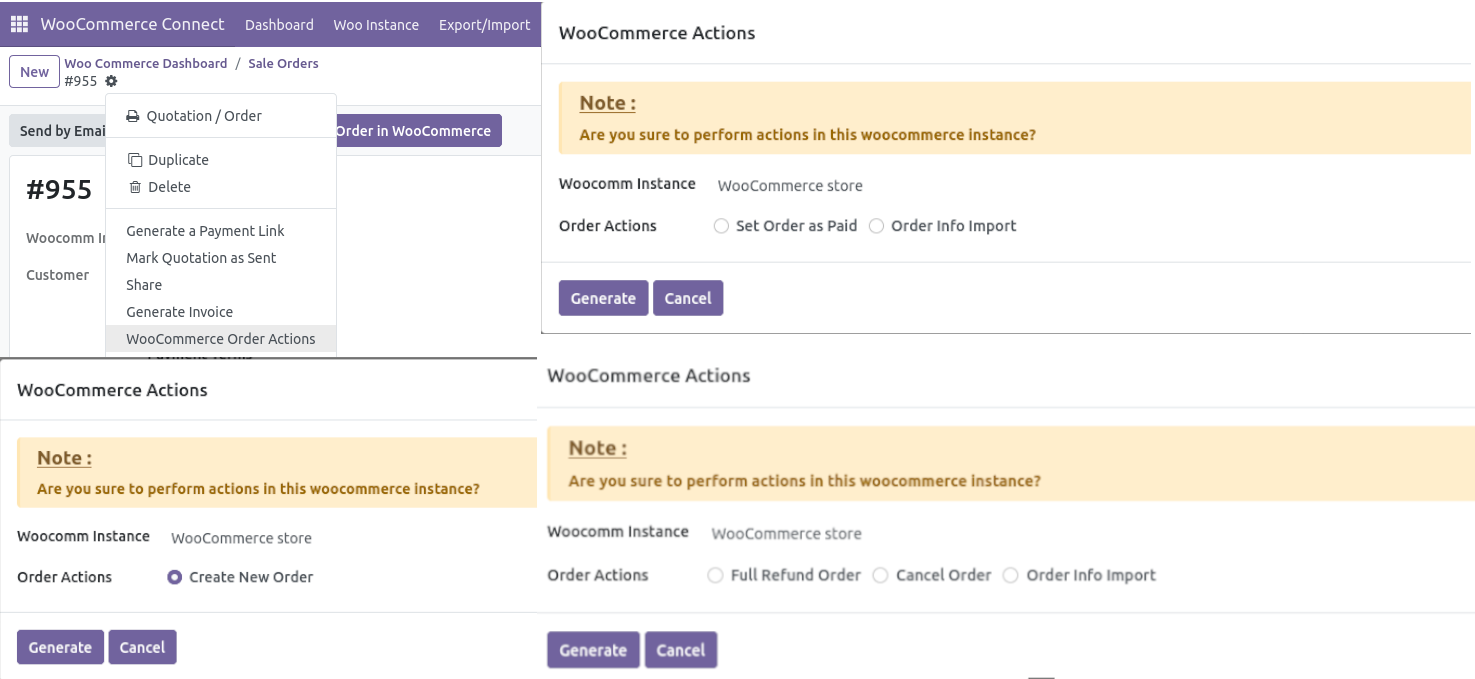
  3. Order Creation in WooCommerce via Odoo
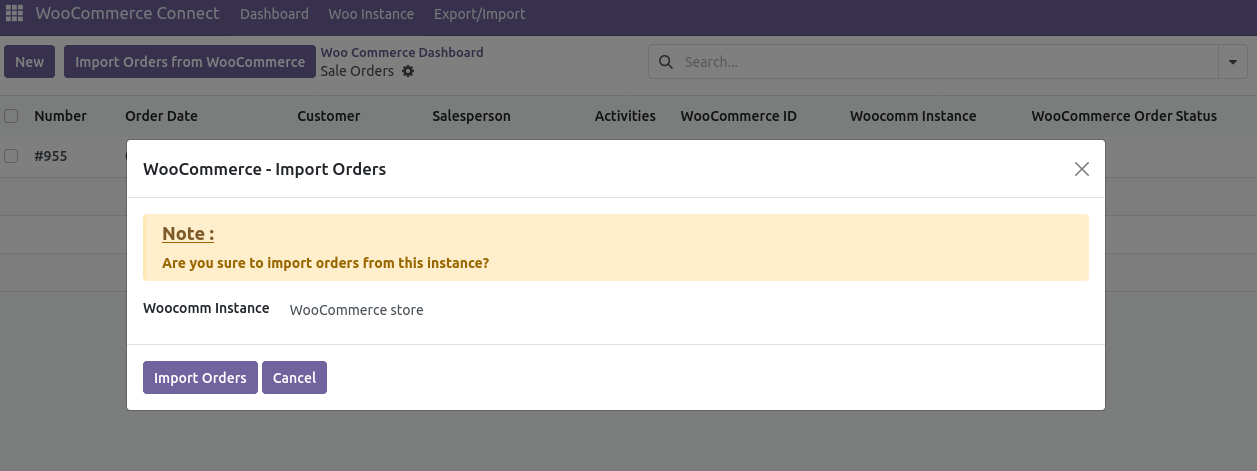
    Create and synchronize orders from Odoo to WooCommerce, ensuring accurate tracking and management across both platforms.
  4. Order Analytics with Graphs
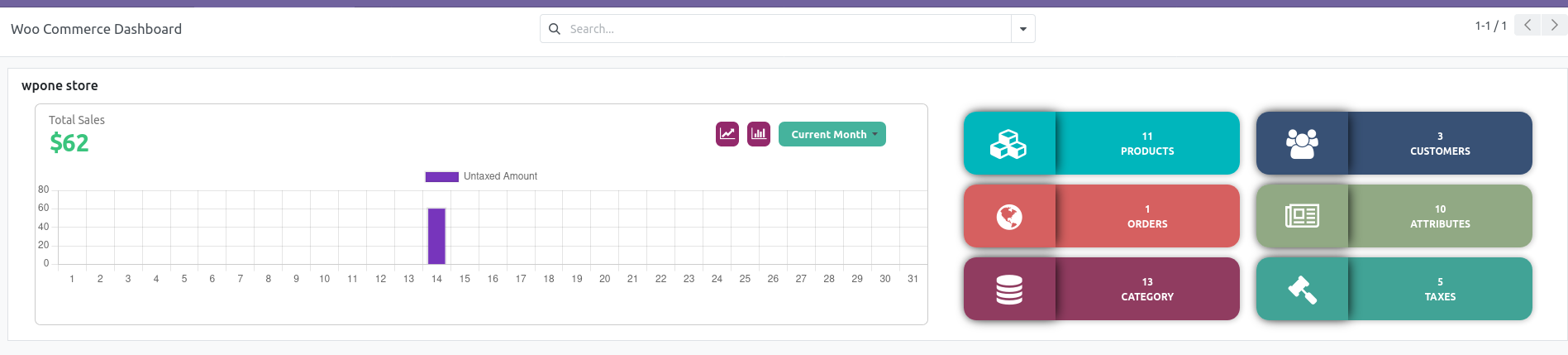
    Visualize order data through graphs within Odoo, providing insights into sales performance.
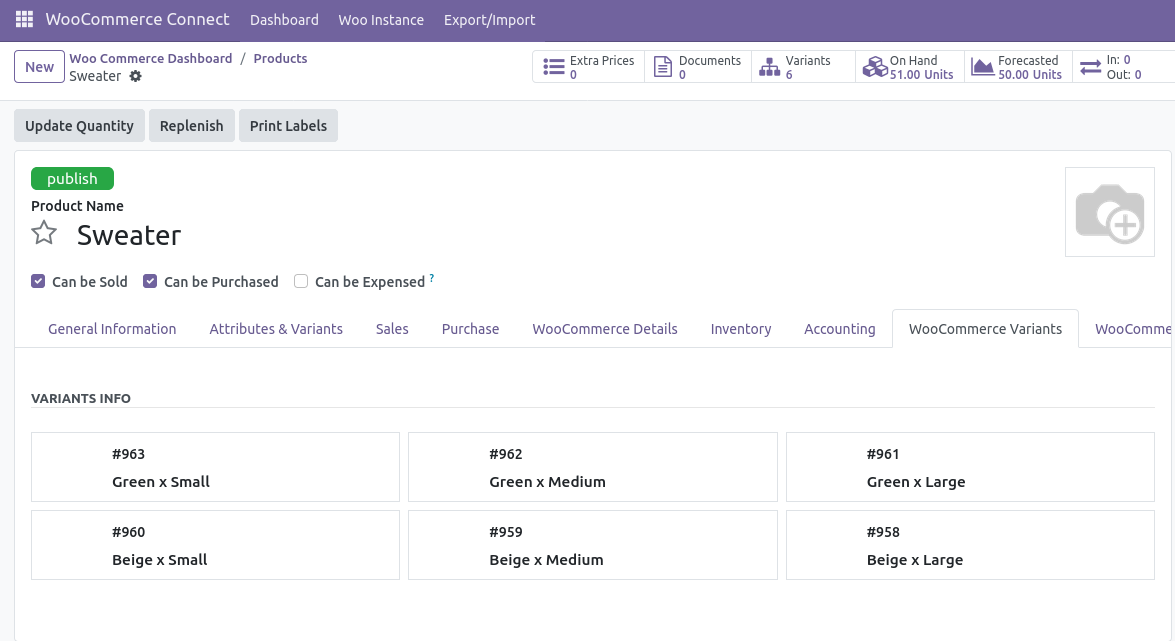
  5. WooCommerce Product Variants Management
    Check and manage WooCommerce product variants, such as size, color, or style, directly from Odoo.
    Ensure accurate variant synchronization for easier inventory and product management.
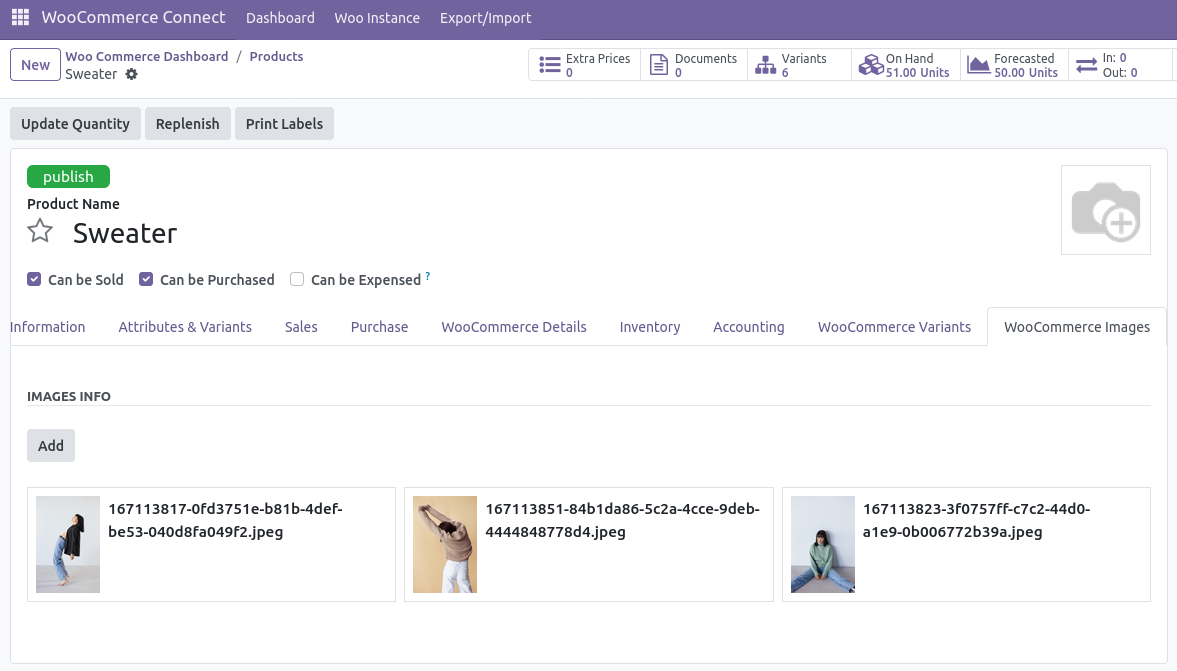
  6. Image Management
    Upload and manage WooCommerce product images directly through Odoo.
    Simplify the process of maintaining a visually appealing product catalog.

Benefits

The Odoo WooCommerce Connector App enhances business operations by allowing synchronization of key data—such as products, customers, orders, and inventory—between Odoo and WooCommerce. This integration eliminates the need to manage both systems separately, reducing errors and improving efficiency. By centralizing product, customer, and order information, businesses can more easily manage eCommerce and enterprise processes from one platform, improving decision-making and streamlining workflows.

This connector is ideal for businesses seeking a robust and efficient way to manage their online store while leveraging Odoo’s ERP capabilities.

Screenshots

2024-11-28T11:01:33+00:00Categories: App Development|Tags: , , , , , , |

Odoo Shopify Connector App

The Odoo Shopify Connector App is a tool that enables seamless synchronization of data between Odoo and Shopify, allowing users to manage and streamline their operations directly within the Odoo platform. By integrating the two systems, this app ensures efficient management of data and enhances workflow between both platforms.
Key Features:

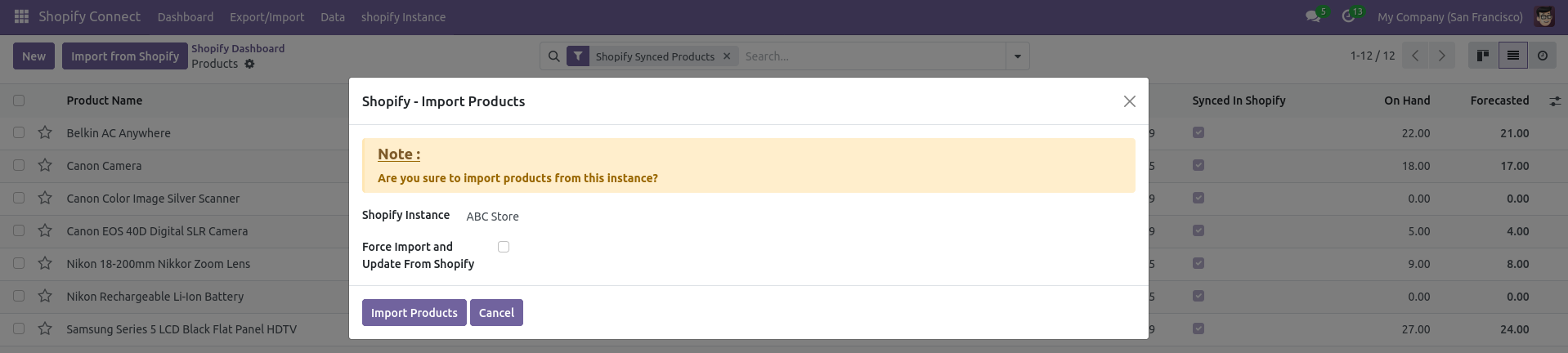
  1. Product Synchronization
    The app allows users to manually synchronize product information between Shopify and Odoo, ensuring that updates made in one system can be reflected in the other, without requiring manual data entry.
  2. Customer Synchronization
    Customer data, including contact information and order history, can be manually synchronized between Shopify and Odoo. This enables businesses to maintain a unified view of customer interactions across both platforms.
  3. Order Creation in Shopify via Odoo
    Users can create new orders directly within Odoo for Shopify, ensuring that orders are processed and tracked seamlessly across both systems.
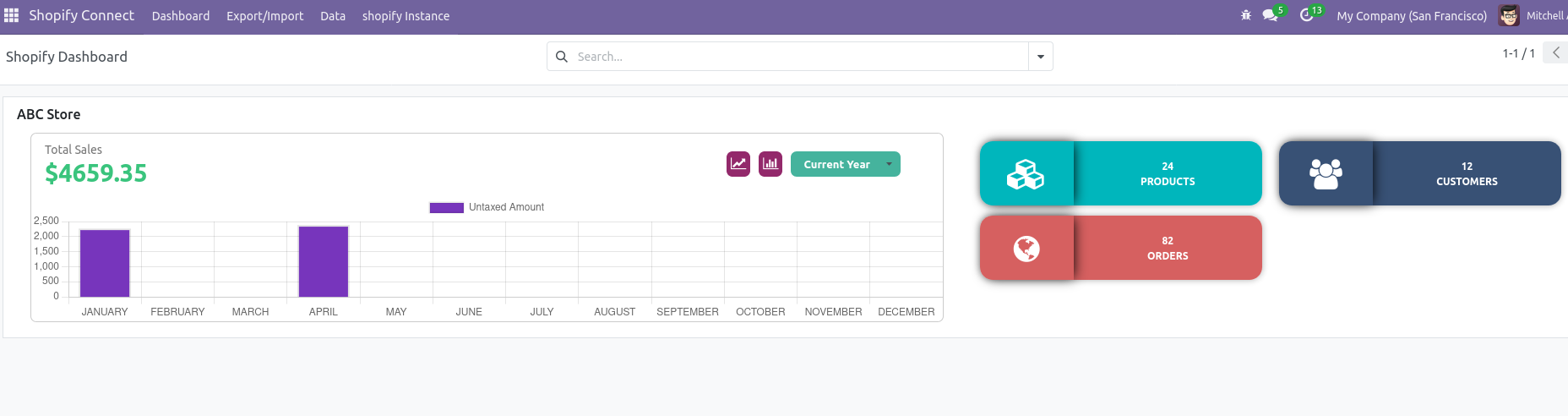
  4. Order Analytics with Graphs
    The app provides visual representations of orders through graphs, helping businesses quickly analyze sales performance.
  5. Manage Shopify Images from Odoo
    Users can manage and update product images for their Shopify store directly within Odoo, streamlining image handling and ensuring consistent product presentation across both platforms.

Overall, the Odoo Shopify Connector App enhances the integration between Odoo and Shopify, allowing businesses to efficiently manage product, customer, and order data while maintaining a smooth workflow across both platforms.

Screenshots

2024-11-29T05:51:09+00:00Categories: App Development|Tags: , , , , , |

Day Wise Product Sales Report – Odoo App

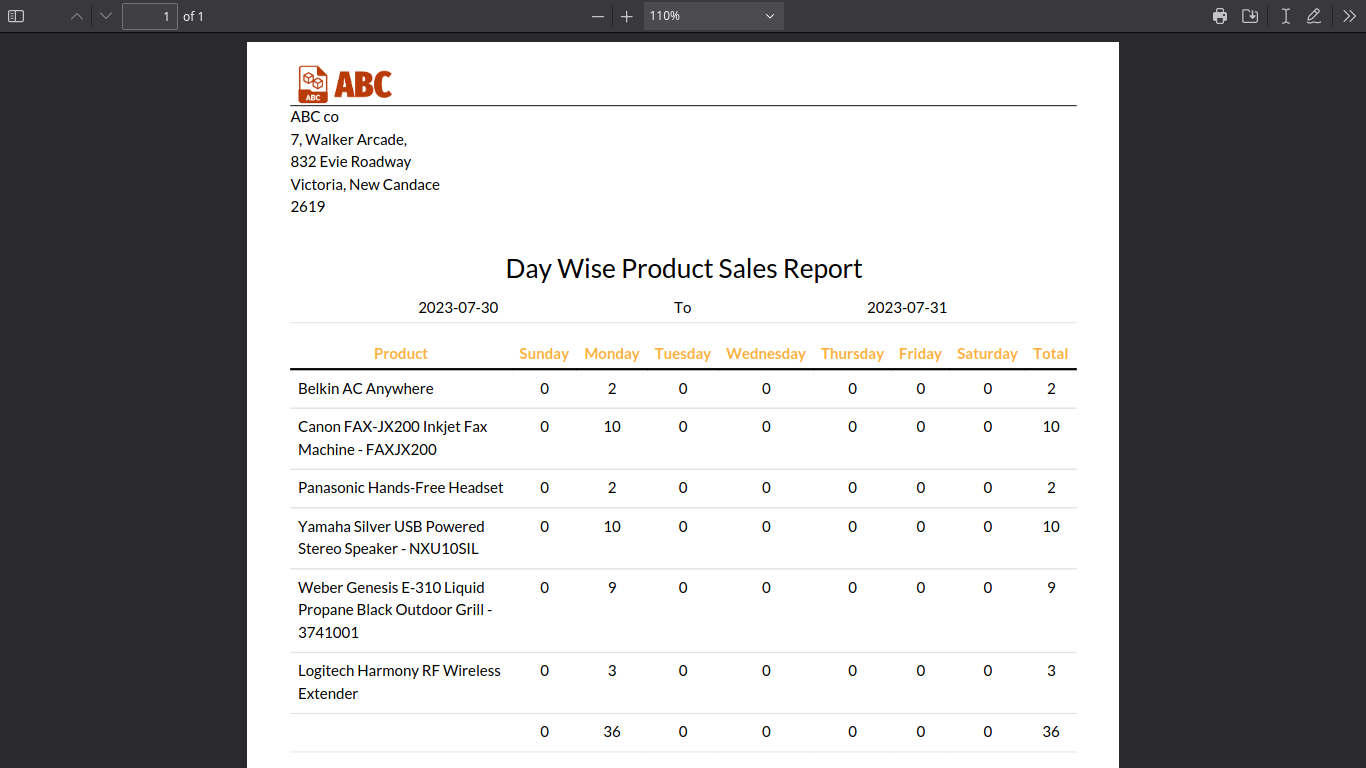
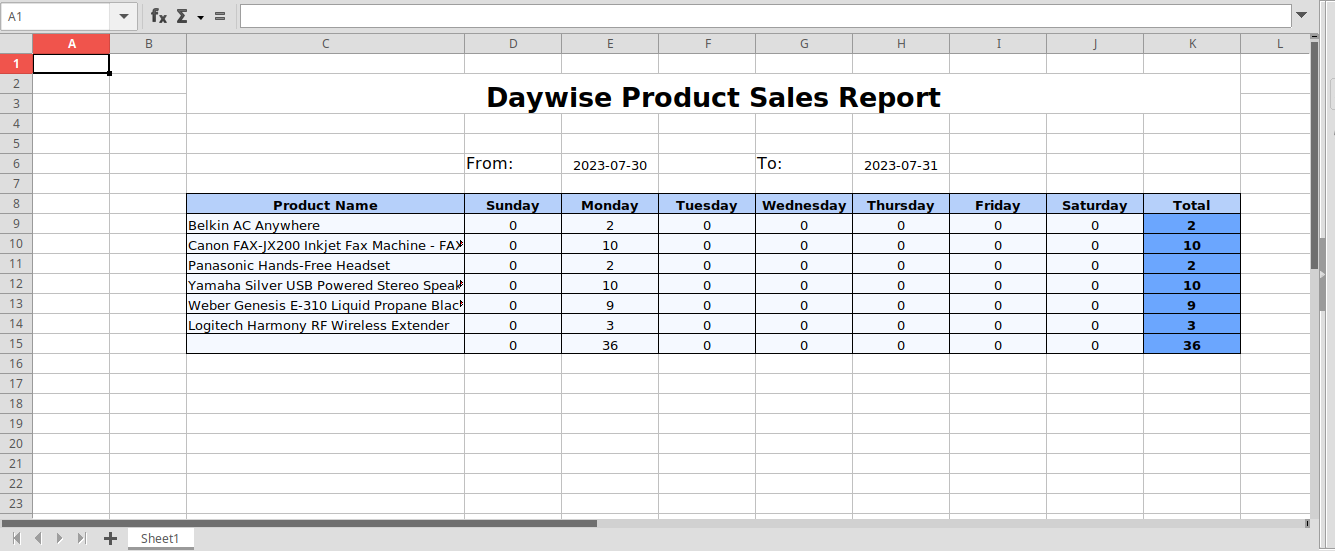
The Day Wise Product Sales Report app is a powerful module for Odoo that empowers businesses to monitor, analyze, and optimize product sales with ease. Designed to deliver actionable insights, this app provides a comprehensive view of daily sales trends, enabling informed decision-making to boost business performance.

Key Features:

  1. Daily Product Sales Insights
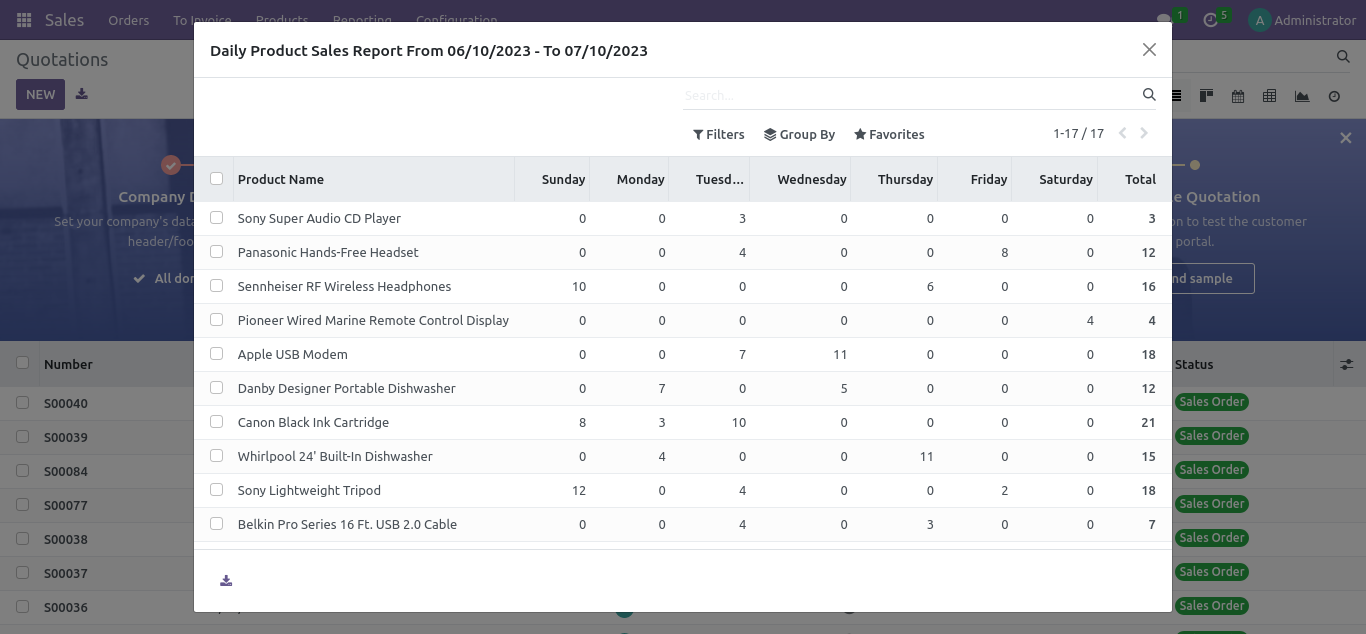
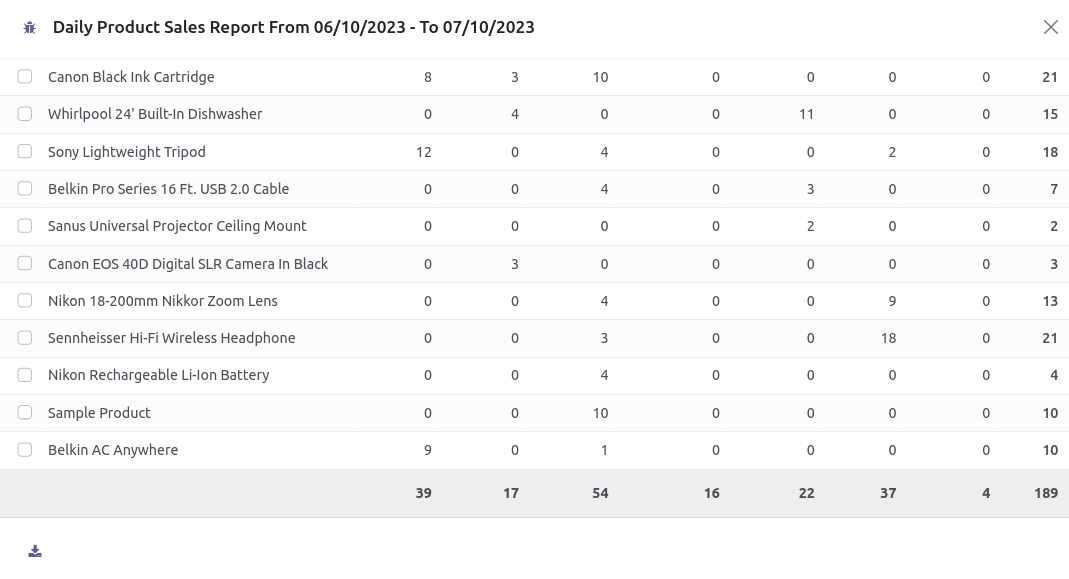
    • The app generates detailed reports that showcase sales performance for individual products on a daily basis.
    • Users can drill down into the specifics of daily sales, gaining clarity on which products are performing well and which require attention.
  2. Customizable Date Range Filters
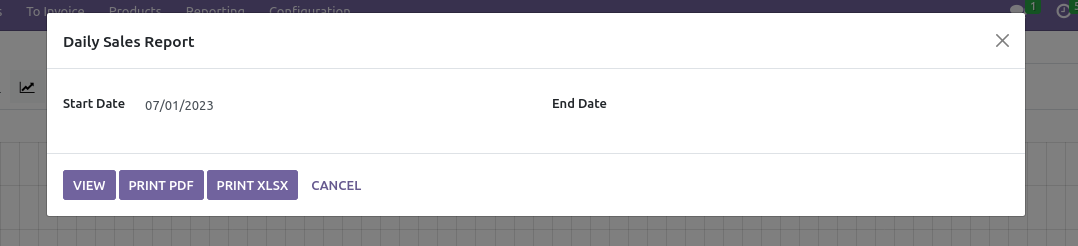
    • Flexible filtering options allow users to refine reports by selecting specific dates or a range of dates.
    • This feature makes it easy to analyze sales performance for any given day, week, or month, offering a customized perspective of trends.
  3. Data-Driven Sales Analysis
    • The app provides businesses with accurate and structured sales data, enabling them to identify patterns, adjust strategies, and optimize inventory.
    • Users can track product popularity, seasonal sales trends, and market demand with precision.
  4. Enhanced Business Decision-Making
    • By offering a clear breakdown of daily sales figures, the app supports businesses in making data-driven decisions to improve their operations.
    • Whether it’s identifying underperforming products or capitalizing on bestsellers, this app equips managers with the insights they need.
  5. Ease of Use
    • With an intuitive interface and seamless integration into the Odoo platform, this app simplifies the sales tracking process.
    • It’s designed to be user-friendly, ensuring that businesses of all sizes can leverage its full potential without technical hurdles.

Benefits:

  • Improved Sales Tracking: Stay updated with real-time sales performance data for better planning and execution.
  • Trend Analysis: Spot emerging trends and adjust your strategy proactively.
  • Operational Efficiency: Eliminate guesswork and streamline sales operations by focusing on data-backed insights.
  • Custom Reports: Generate reports tailored to your business needs, enabling better forecasting and decision-making.

The Day Wise Product Sales Report app is ideal for businesses aiming to maintain a competitive edge by effectively managing their sales data. With this module, you can transform your daily sales data into actionable intelligence, ensuring consistent growth and customer satisfaction.

Screenshots

2024-11-29T08:41:19+00:00Categories: App Development|Tags: , , , , , |

MSTeams Chat App

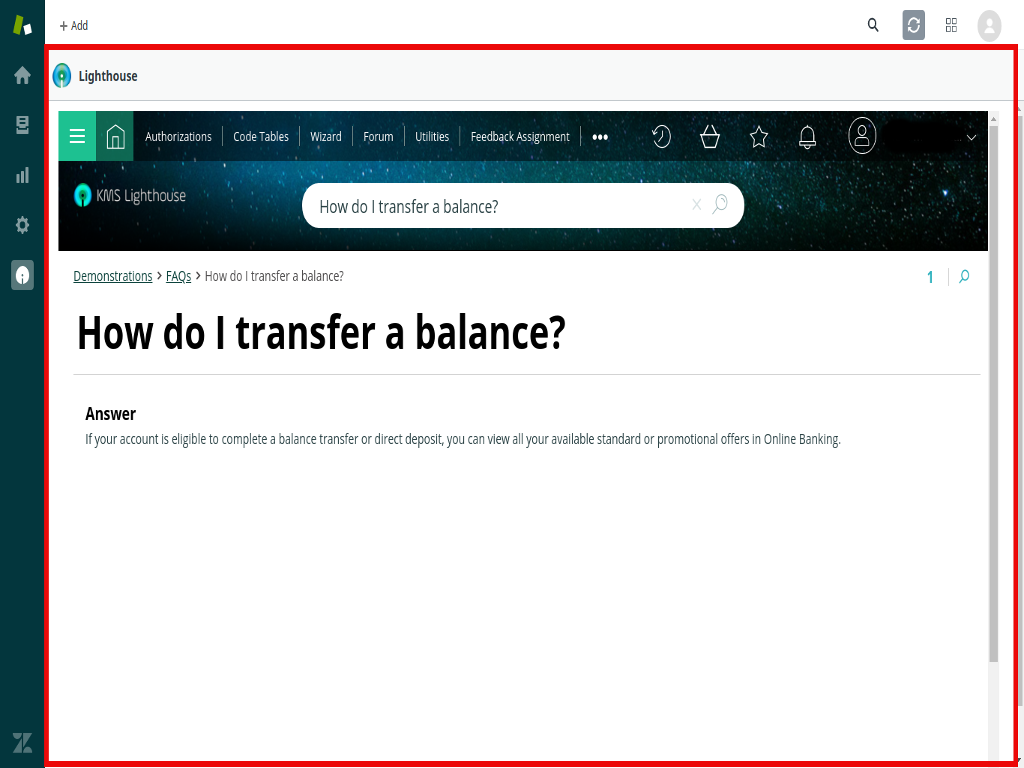
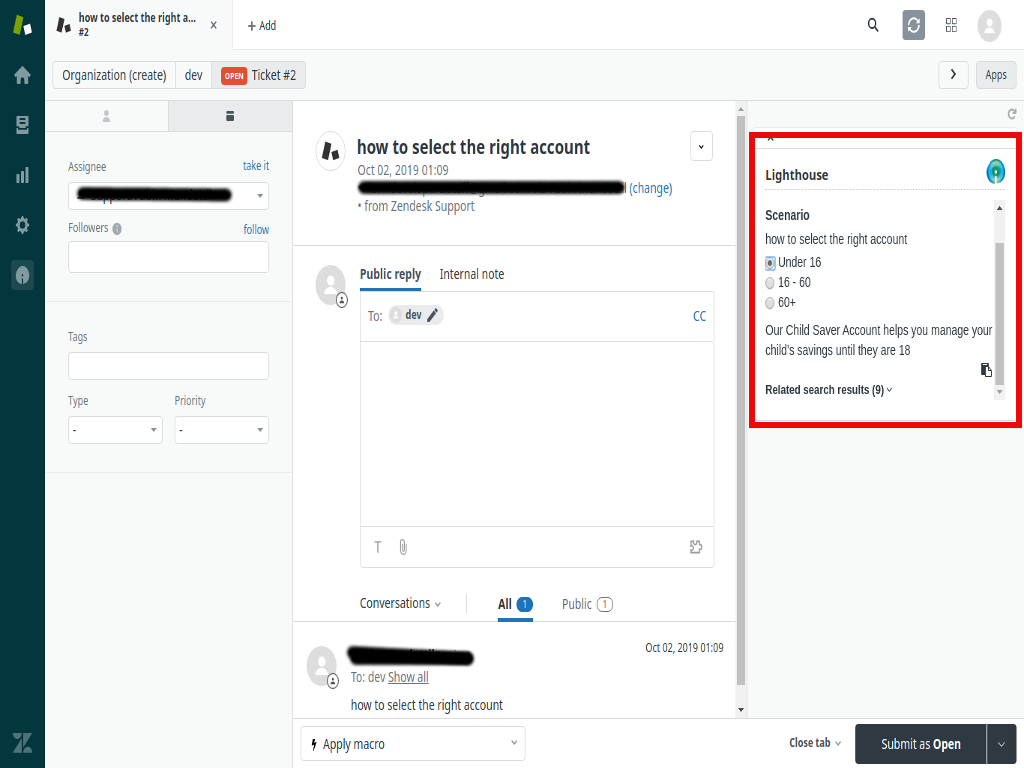
Metclouds developed a custom Microsoft Teams application designed to seamlessly integrate a leading Knowledge Management System (KMS) directly within the Microsoft Teams environment. This integration aimed to streamline the knowledge-sharing process, allowing users to quickly access, search, and retrieve valuable information without leaving their Teams workspace.

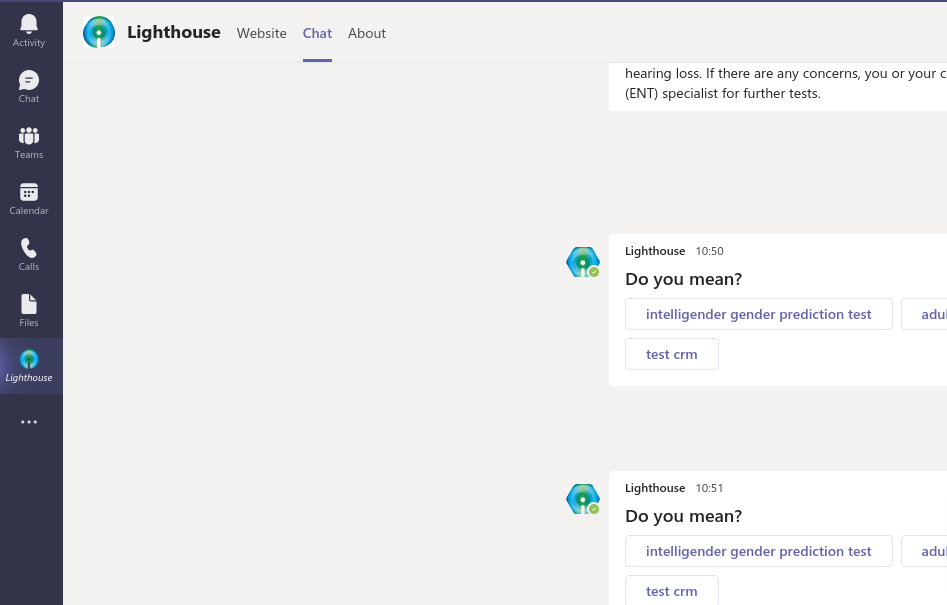
We have created a fully functional Microsoft Teams chatbot application that enables users to search for and retrieve knowledge base articles from an external KMS source. The app was developed using the Microsoft Teams API and Node.js, ensuring robust functionality and ease of use.

Key Features and Benefits:

  • Intuitive User Interface: The chatbot allows users to easily search for specific knowledge base articles by entering queries directly within the Teams interface. This eliminates the need to switch between multiple platforms, improving workflow efficiency.
  • Seamless Information Retrieval: Users can access detailed knowledge articles with just a few clicks. They can search, view, and even copy relevant content from the response for quick reference or sharing.
  • External System Integration: The app pulls knowledge base articles from an external KMS, ensuring that users always have access to up-to-date and accurate information.
  • Enhanced Collaboration: By integrating the KMS into Microsoft Teams, users can collaborate more effectively, sharing knowledge and insights directly within the chat environment, thus fostering a more productive and informed team dynamic.
  • Scalable and Secure: The app was built with scalability in mind, allowing it to grow with the organization’s knowledge base and handle increasing user demand. Additionally, security protocols were implemented to protect sensitive data during the retrieval process.

Technologies Used:

  • Microsoft Teams API: For building the Teams chatbot and ensuring smooth integration with the Teams environment.
  • Node.js: As the backend technology to handle API requests, responses, and manage the integration with the external KMS.
  • External Knowledge Management System: Integrated with a third-party system to fetch articles and display them within the Teams chatbot interface.
Screenshots

Freshdesk Ticket Merge App

The Freshdesk Ticket Merge App is a custom-built solution designed to streamline ticket management for customer support teams using Freshdesk. This app allows agents to merge multiple tickets that share a common subject or email thread, ensuring that related customer inquiries are handled more efficiently. By automatically identifying tickets with the same subject and checking the email addresses associated with them, the app eliminates redundancy, prevents duplicate work, and improves the overall user experience for both agents and customers.

In busy support environments, customers often submit multiple tickets for the same issue, either because they forget to follow up on an existing ticket or accidentally submit a new ticket while waiting for a response. These multiple tickets can overwhelm support teams and lead to inefficiencies. The Freshdesk Ticket Merge App addresses this challenge by allowing agents to merge related tickets seamlessly and organize them in a threaded conversation. This helps agents resolve issues more quickly and ensures that the customer’s experience is not fragmented across different tickets.

Key Features and Functionality:

  1. Automatic Ticket Identification:
    • Subject-Based Identification: The app scans incoming tickets and identifies tickets that share the same email subject. This allows the app to automatically group tickets that are part of the same issue or inquiry, even if they were submitted as separate tickets.
  2. Merging of Related Tickets:
    • Merge Tickets Seamlessly: Once the app identifies tickets that share the same subject and email address, it allows agents to merge these tickets into one thread, consolidating all the communication into a single, unified conversation. This prevents confusion caused by multiple threads on the same issue and provides a better customer experience.
    • Preserve Ticket History: When tickets are merged, the app preserves all the previous communication, including the original messages, replies, and any internal notes added by agents. This ensures that agents can view the full conversation history, making it easier to understand the customer’s issue and resolve it efficiently.
    • Ticket Threading: After merging, the app automatically threads the tickets properly, creating a single, coherent conversation stream. This makes it easier for both agents and customers to follow the progress of the issue, track responses, and keep everything organized in one place.
  3. Avoid Duplicate Work:
    • Prevent Duplicate Responses: By merging related tickets, the app ensures that agents do not waste time working on multiple tickets for the same issue. This eliminates the risk of sending duplicate responses to customers or working on redundant information, which can be frustrating for both agents and customers.
    • Centralized Communication: With multiple tickets merged into a single thread, agents can focus on a unified resolution rather than managing several tickets separately. This also allows for better prioritization of cases, as all communication is visible in one place, allowing agents to spot critical issues more easily.
  4. Improved Agent Workflow:
    • Streamlined Ticket Management: The app simplifies the workflow for support agents by reducing the number of individual tickets they need to manage. With a clearer and more organized view of each customer’s issue, agents can resolve tickets more efficiently and improve response times.
    • Faster Resolution: Since related tickets are merged into a single thread, agents have a more complete picture of the customer’s history, which leads to faster resolutions. Instead of jumping between different tickets to gather information, the agent has everything in one place.
    • Collaboration Efficiency: Merging tickets also helps when multiple agents are working on the same issue. With a unified conversation thread, agents can collaborate more effectively, share information more easily, and avoid working on the same ticket separately.

Key Benefits of the Freshdesk Ticket Merge App:

1. Improved Efficiency:

By automatically identifying and merging related tickets, the app reduces the time spent managing duplicate or redundant tickets. Agents can focus on solving the customer’s issue rather than sorting through multiple tickets on the same topic, which leads to quicker response times and faster resolutions.

2. Better Customer Experience:

Merging tickets ensures that customers receive responses from agents who have access to the full context of their issue. Customers no longer have to repeat themselves or track multiple conversations, leading to a more seamless and coherent support experience.

3. Enhanced Organization:

With the app’s ability to thread tickets correctly and merge them into one, support teams can maintain a cleaner, more organized ticketing system. This reduces clutter and makes it easier to track the progress of customer issues over time.

4. Reduced Ticket Backlog:

By combining multiple tickets into a single, unified thread, the app helps keep the support system free from clutter and reduces the number of open tickets. This makes it easier for agents to focus on the issues that matter most, reducing the risk of ticket overload or backlogs.

Freshdesk Ticket limit app

The Freshdesk Ticket Limit App is a custom-built solution designed to enhance the efficiency of support teams and maintain effective ticket management by monitoring the number of support tickets opened by customers. This app is particularly useful for businesses that have a contractual limit on the number of support tickets a customer can open within a specific time frame, such as monthly or annually. The app helps by automatically tracking the number of tickets a customer has opened and alerting the support team or group members whenever a customer exceeds their contracted ticket limit.

By ensuring that customers adhere to their ticket limits, the app helps support teams maintain better control over their service level agreements (SLAs), manage workloads, and avoid providing excessive support outside of contractual agreements. This proactive solution can help avoid customer abuse of support resources while also promoting transparency and clear communication between support agents and customers regarding ticket limits.

Key Features and Functionality:

  • Automatic Ticket Count Tracking:
    • Real-Time Ticket Tracking: The app continuously tracks the number of tickets a customer has opened within a specified period. It maintains an accurate count of tickets submitted by each customer and compares it against the contractual limit defined by the business or organization.
    • Customizable Ticket Limit: Administrators can configure the contractual ticket limit for each customer or group of customers. For example, customers may have a limit of 5 tickets per month, or certain customers may have different limits based on their support contract tier.
  • Alerts for Exceeding Ticket Limits:
    • Real-Time Alerts: Whenever a customer exceeds their contracted number of tickets, the app sends an alert notification to relevant group members, such as support agents, managers, or team leads. This ensures that the team is immediately aware of any breaches in the ticket limit
  • Seamless Integration with Freshdesk:
    • Built-In with Freshdesk: The Freshdesk Ticket Limit App integrates directly with Freshdesk’s ticketing system, so the entire ticket management process remains smooth and seamless. It doesn’t require agents to manually track ticket counts or manually enforce ticket limits; the app automates the entire workflow.

Key Benefits of the Freshdesk Ticket Limit App:

1. Improved Ticket Management:

By keeping track of customer ticket limits, the app reduces the risk of customers exceeding their support quota and helps avoid unnecessary support overload. It ensures that ticket management is organized, efficient, and in line with customer agreements.

2. Proactive Support:

The app’s ability to send real-time alerts and proactively enforce ticket limits means that support teams can address potential issues before they escalate, ensuring that customers are aware of their usage and that the support team can take corrective action if needed.

3. Enhanced Contract Compliance:

This app ensures that businesses remain compliant with their contractual obligations, preventing customers from opening an excessive number of tickets beyond their agreed-upon limits, and enforcing contract terms without requiring manual oversight.

4. Time Savings for Agents:

With automatic ticket counting and limit enforcement, agents don’t need to manually track ticket limits for each customer. The app automatically notifies the support team when limits are reached, saving time and reducing administrative overhead.

5. Increased Revenue Opportunities:

The app can identify customers who frequently exceed their ticket limits, creating an opportunity for upselling additional tickets or support plans. By automatically prompting agents to suggest plan upgrades when customers reach their ticket limits, businesses can convert more customers to higher-paying plans.

6. Better Customer Experience:

Customers are kept informed about their ticket usage and the status of their support requests. By preventing ticket overload, the app ensures that the support team can focus on providing high-quality service to each customer, improving satisfaction.

Ticket resolution time app

The Freshdesk Ticket Resolution Time App is a custom-built tool designed to enhance the accuracy and completeness of ticket management by ensuring that the resolution time for every support ticket is properly logged before closing the ticket. Accurate tracking of resolution time is essential for both performance metrics and customer service quality. This app checks whether the resolution time has been recorded in the ticket’s time logs, and if not, it prompts the agent to enter the missing information when closing the ticket.

Properly documenting resolution times allows businesses to track support efficiency, monitor agent performance, and analyze trends in how long it takes to resolve issues, which can be used for improving processes and identifying bottlenecks. Additionally, this data helps reporting and supports billing in scenarios where support is tied to specific service level agreements (SLAs).

Key Features and Functionality:

  1. Automatic Resolution Time Check:
    • Time Log Verification: The app automatically checks whether the ticket resolution time has been recorded in the time logs for each ticket. When an agent attempts to close a ticket, the app checks the associated logs to see if the resolution time is present.
    • Missing Resolution Time Detection: If the resolution time is missing or not properly logged, the app will trigger a notification to alert the agent that the ticket cannot be closed without entering the missing data. This ensures that no ticket is closed prematurely or without a complete record.
  2. Prompt for Resolution Time Entry:
    • Real-Time Prompt on Ticket Closure: When an agent tries to close a ticket without adding the resolution time, the app will prompt the agent with a reminder, asking them to fill in the missing time entry before completing the ticket closure.
    • Customizable Prompt Message: Admins can customize the wording of the prompt to fit the tone of the organization and provide specific guidance to agents about the importance of resolution time tracking. For example, a prompt could say: “Please log the time taken to resolve this issue before closing the ticket.”
    • Resolution Time Field: The app will display a simple, user-friendly input field where the agent can easily enter the resolution time in minutes, hours, or any time format configured by the organization.
  3. Manual and Automated Resolution Time Input:
    • Manual Entry of Resolution Time: The app gives the agent the ability to manually enter the time spent on the ticket resolution. This is particularly useful in cases where the agent needs to estimate the time spent resolving the issue or needs to account for non-continuous work (e.g., time spent waiting for customer feedback, investigating an issue over a few days, etc.).
    • Time Formatting Flexibility: The app supports various time formats, allowing agents to log time in hours, minutes, or any custom time unit depending on the business needs.
  4. Seamless Integration with Freshdesk:
    • Native Integration with Freshdesk: The app is designed to integrate directly with Freshdesk’s ticketing system, ensuring that ticket resolution time is accurately logged without interrupting existing workflows. It works seamlessly with Freshdesk’s ticket fields, user interface, and reporting tools.
    • Easy Installation and Maintenance: The app is easy to install and maintain within the Freshdesk environment, requiring minimal configuration from the admin side. It fits naturally into the existing Freshdesk interface, and agents can quickly adopt it without needing additional training or complicated setup steps.

Key Benefits of the Freshdesk Ticket Resolution Time App:

1. Improved Reporting and Analytics:

By ensuring that resolution time is always logged, the app provides businesses with accurate, actionable insights into their support performance. Managers can analyze ticket resolution times across different agents, teams, or departments, leading to better decision-making and more informed process improvements.

2. Better Accountability and Performance Monitoring:

With a structured system for tracking resolution times, the app helps improve agent accountability and ensures that each agent takes responsibility for properly logging time. It also provides valuable data for performance evaluations, helping managers reward high performers and offer support where needed.

3. Enhanced Customer Service:

Accurate tracking of resolution time helps ensure that customers receive timely support. By maintaining proper logs, businesses can identify delays and address bottlenecks in their processes, ultimately improving customer satisfaction and meeting customer expectations.

4. Streamlined Ticket Closure Process:

With automatic prompts for entering resolution time, the app streamlines the ticket closure process, ensuring that all relevant data is captured before a ticket is marked as resolved. This eliminates the risk of incomplete records and ensures better data consistency across the system.

Create contacts and leads freshsales app

The Freshsales Contact and Lead Creation App is a custom-built integration designed to streamline the process of transferring customer information from Freshdesk to Freshsales. The app enables businesses to create contacts and leads in Freshsales directly from the details stored in Freshdesk tickets, simplifying and automating the process of managing and nurturing customer relationships.

Support teams often interact with customers through tickets in Freshdesk, which contain valuable information such as customer names, email addresses, phone numbers, and other key details. By integrating this information directly into Freshsales, the app ensures that sales teams can follow up on customer issues, track potential sales opportunities, and manage customer relationships more efficiently. This creates a seamless connection between support and sales, allowing businesses to leverage ticket data for future sales and marketing initiatives.

Key Features and Functionality:

  1. Seamless Integration between Freshdesk and Freshsales:
    • Automated Data Transfer: The app automatically transfers relevant customer information from Freshdesk tickets into Freshsales as either contacts or leads. This eliminates the need for manual data entry, saving time and reducing the chances of human error.
    • Sync Ticket Data to Freshsales: The app pulls information from ticket fields in Freshdesk, such as customer names, email addresses, phone numbers, and other relevant fields, and creates corresponding records in Freshsales. This ensures that sales teams have up-to-date and accurate information for follow-up.
  2. Contact Creation from Ticket Details:
    • Capture Essential Contact Information: The app can automatically create a contact in Freshsales using key details from a Freshdesk ticket. This includes the customer’s name, email address, phone number, and any other relevant details such as company name or location.
    • Avoid Duplicate Contacts: To prevent duplication of customer data, the app checks whether a contact with the same email address or phone number already exists in Freshsales before creating a new record. This ensures that the CRM database remains clean and organized.
  3. Lead Creation from Ticket Details:
    • Leads from Support Interactions: When a customer raises a ticket indicating a sales opportunity (e.g., a customer asking for more information about a product, inquiring about pricing, or expressing interest in an upgrade), the app automatically creates a lead in Freshsales based on the details from the ticket.
    • Track Ticket-Lead Relationship: The app can maintain a link between the Freshdesk ticket and the corresponding Freshsales lead. This allows the sales team to see the context of the lead, including any prior support interactions, giving them valuable insights into the customer’s issues and needs.
  4. Lead and Contact Enrichment:
    • Populate Freshsales Fields with Ticket Data: The app not only transfers basic contact information but also enriches the lead or contact records in Freshsales by mapping additional ticket data into custom fields. For example, a ticket’s subject, priority level, or the description of the issue can be added to Freshsales to provide the sales team with more context.
  5. Seamless User Interface:
    • User-Friendly Interface: The app is designed with a simple and intuitive interface. Agents do not need to navigate between different systems to transfer information. The app works within Freshdesk, allowing agents to quickly and easily create contacts or leads without leaving the ticket screen.
    • Easy Installation and Setup: The app can be easily installed and configured in Freshdesk, with minimal setup required. Admins can quickly set up the mapping rules, configure workflow automation, and begin leveraging the integration without the need for complex technical setup.

Key Benefits of the Freshsales Contact and Lead Creation App:

1. Streamlined Sales Workflow:

By automatically creating contacts and leads in Freshsales from Freshdesk tickets, the app eliminates the need for manual data entry, reducing administrative overhead and ensuring that the sales team always has up-to-date information about customers.

2. Improved Sales and Support Collaboration:

The seamless integration between Freshdesk and Freshsales promotes better collaboration between support and sales teams. Support agents can easily pass along qualified leads to the sales team, ensuring that no opportunity is missed, and that follow-up is done in a timely and organized manner.

3. Increased Lead Conversion:

The app ensures that support interactions that have sales potential are automatically tracked and converted into leads, increasing the chances of turning a satisfied customer into a repeat buyer or upselling them on additional products or services.

4. Time and Effort Savings:

The automation of the lead and contact creation process eliminates the need for agents or support staff to manually copy over information from Freshdesk tickets into Freshsales. This saves valuable time, allowing agents and sales reps to focus on higher-value activities.

5. Better Customer Insights:

By transferring ticket data to Freshsales, the app provides sales teams with more context about the customer’s needs, pain points, and interactions with the support team. This gives sales reps a better understanding of the customer’s journey, helping them tailor their approach and provide more personalized service.

6. Reduced Data Entry Errors:

The automation of data transfer reduces the risk of manual errors when transferring customer information from one system to another. This ensures that customer records in Freshsales are accurate and up-to-date.


Clearbit integration in Freshdesk

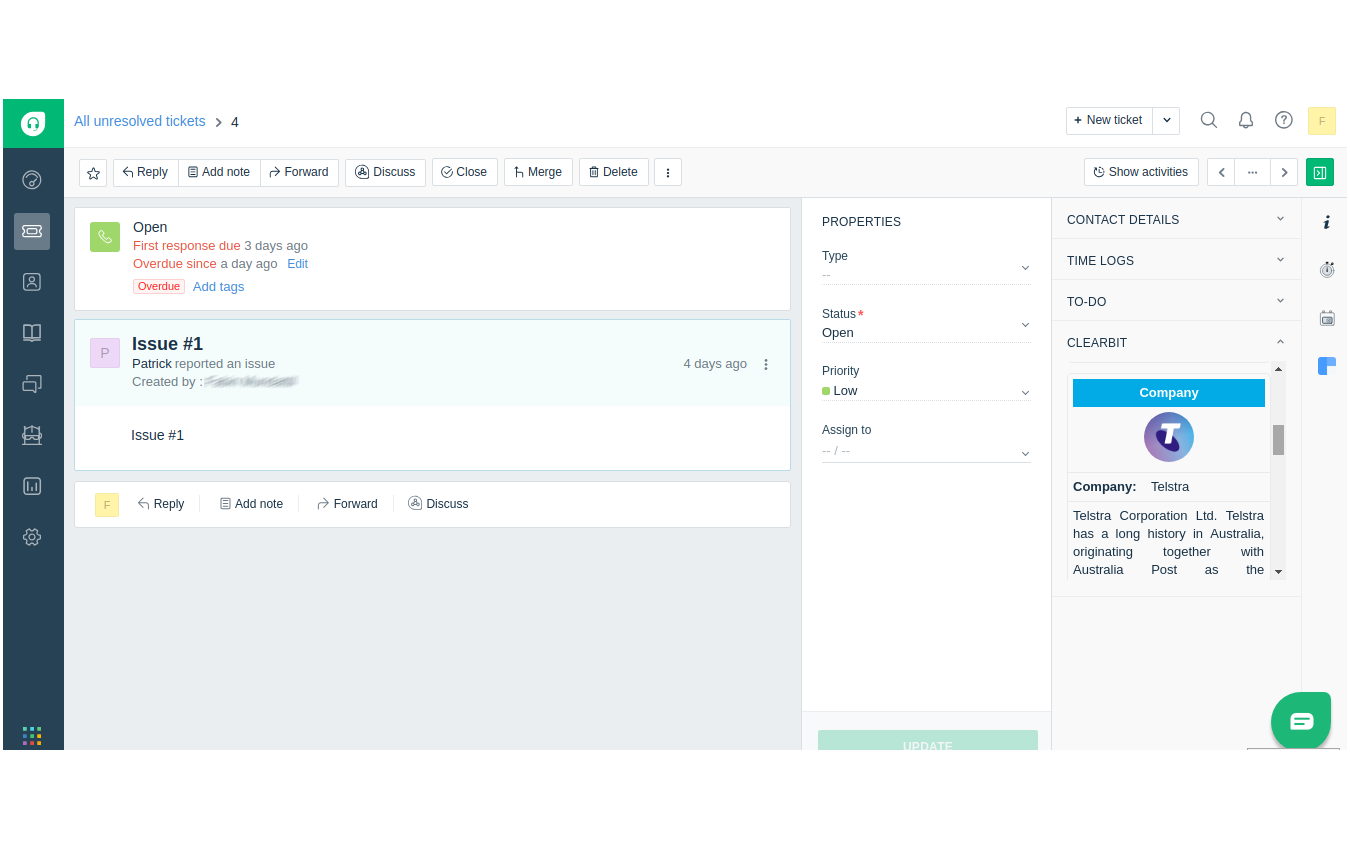
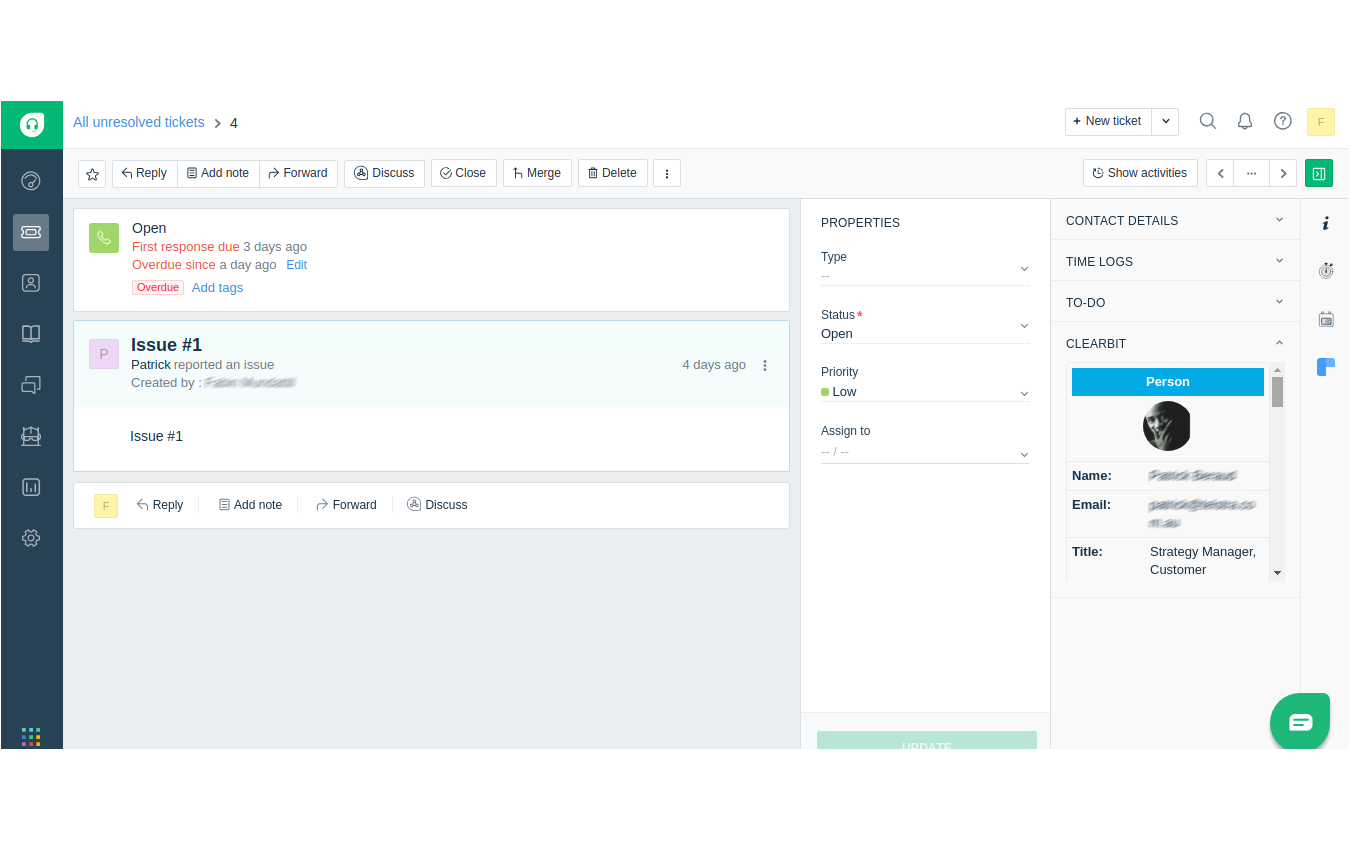
The Clearbit Integration in Freshdesk is a custom-built app designed to seamlessly connect Clearbit’s rich customer and company data with Freshdesk’s ticketing system. Clearbit, a platform for discovering detailed company and individual profiles based on email addresses, provides valuable insights such as job titles, company size, revenue, and social profiles. This integration allows Freshdesk agents to automatically enrich customer tickets with this data, enabling a more personalized and efficient support experience.
Support agents often deal with customer issues and inquiries through Freshdesk tickets. By integrating Clearbit’s powerful data enrichment into this workflow, agents can instantly access detailed information about the customer or company associated with a ticket, allowing them to respond more quickly and effectively. This connection between Clearbit and Freshdesk ensures that agents have the context they need to provide superior service and, at the same time, opens opportunities for sales teams to track leads and potential sales opportunities from support interactions.

Key Features and Functionality:

  1. Seamless Data Enrichment:
    • Instant Customer Enrichment: With just the customer’s email address, the app automatically pulls in detailed information such as company name, industry, revenue, job titles, and social media profiles from Clearbit, directly into the Freshdesk ticket interface.
    • Automatic Data Syncing: The integration ensures that Clearbit data is synced in real-time, ensuring agents always have access to up-to-date and accurate customer profiles.
  2. Lead Identification and Qualification:
    • Turn Support Interactions into Sales Opportunities: The integration allows support agents to identify potential sales opportunities in customer tickets. When a ticket indicates interest in a product or service, the system can flag it as a potential lead for the sales team.
    • Customizable Lead Scoring: Businesses can set up automated rules that qualify tickets based on customer profiles or interactions (e.g., a high-value company or a request for product information), allowing the sales team to focus on high-potential leads.
  3. Automated Enrichment for Personalized Support:
    • Contextual Customer Information: With enriched data from Clearbit, agents can instantly access relevant customer details (such as company size, industry, and role) to offer a more tailored response, increasing the likelihood of resolving issues quickly and effectively.
    • Improved Communication: With insights into the customer’s business, industry, or social media presence, agents can craft more relevant responses and communicate with a deeper understanding of the customer’s needs.
  4. Lead-to-Support Alignment:
    • Unified Customer Journey: Support agents and sales teams can track the same customer profiles across systems, ensuring continuity of the customer journey from support to sales. Any ticket interaction that indicates a sales opportunity can be tagged and passed seamlessly to the sales team.
    • Lead Assignment: When a support interaction results in a sales opportunity, the Clearbit data can automatically be transferred to the sales team, with leads assigned based on predefined criteria like product interest or company size.
  5. Seamless User Interface:
    • Easy-to-Use Interface: The app integrates smoothly into the Freshdesk interface, allowing agents to view Clearbit’s enriched data without navigating away from the ticket screen. This reduces friction and keeps the workflow simple and efficient.
    • Minimal Setup: The app can be quickly installed and configured in Freshdesk with minimal technical expertise required. Admins can easily set up the integration, define lead-scoring rules, and begin leveraging enriched data within minutes.

Key Benefits of the Clearbit Integration:

  • Enhanced Support Interactions:
    By having access to detailed company and individual profiles, support agents can provide more personalized and informed responses. This leads to quicker resolutions and a more positive customer experience.
  • Increased Lead Conversion:
    Support agents can easily identify high-potential leads, passing qualified prospects to the sales team for follow-up. This seamless transition between support and sales boosts the chances of converting a support ticket into a sales opportunity.
  • Time and Effort Savings:
    The automated enrichment of customer data eliminates the need for agents to manually research customers, saving valuable time and ensuring that every customer interaction is based on the most up-to-date information.
  • Improved Collaboration Between Support and Sales:
    The integration creates a shared pool of customer data that is accessible to both the support and sales teams. This alignment ensures that no lead is missed, and sales reps can follow up on the most relevant opportunities.
  • Better Customer Insights:
    The Clearbit data provides a deeper understanding of each customer’s background, allowing agents to tailor their support and sales strategies accordingly. This results in more meaningful interactions and a better overall customer experience.
  • Reduced Manual Effort:
    By automatically pulling in customer data and syncing information across systems, the app reduces the need for manual data entry, helping businesses maintain accurate and consistent customer records.
Screenshots

Go to Top