
About leedsadm

This author has not yet filled in any details.
So far leedsadm has created 43 blog entries.

Freshdesk Ticket limit app

The Freshdesk Ticket Limit App is a custom-built solution designed to enhance the efficiency of support teams and maintain effective ticket management by monitoring the number of support tickets opened by customers. This app is particularly useful for businesses that have a contractual limit on the number of support tickets a customer can open within a specific time frame, such as monthly or annually. The app helps by automatically tracking the number of tickets a customer has opened and alerting the support team or group members whenever a customer exceeds their contracted ticket limit.

By ensuring that customers adhere to their ticket limits, the app helps support teams maintain better control over their service level agreements (SLAs), manage workloads, and avoid providing excessive support outside of contractual agreements. This proactive solution can help avoid customer abuse of support resources while also promoting transparency and clear communication between support agents and customers regarding ticket limits.

Key Features and Functionality:

  • Automatic Ticket Count Tracking:
    • Real-Time Ticket Tracking: The app continuously tracks the number of tickets a customer has opened within a specified period. It maintains an accurate count of tickets submitted by each customer and compares it against the contractual limit defined by the business or organization.
    • Customizable Ticket Limit: Administrators can configure the contractual ticket limit for each customer or group of customers. For example, customers may have a limit of 5 tickets per month, or certain customers may have different limits based on their support contract tier.
  • Alerts for Exceeding Ticket Limits:
    • Real-Time Alerts: Whenever a customer exceeds their contracted number of tickets, the app sends an alert notification to relevant group members, such as support agents, managers, or team leads. This ensures that the team is immediately aware of any breaches in the ticket limit
  • Seamless Integration with Freshdesk:
    • Built-In with Freshdesk: The Freshdesk Ticket Limit App integrates directly with Freshdesk’s ticketing system, so the entire ticket management process remains smooth and seamless. It doesn’t require agents to manually track ticket counts or manually enforce ticket limits; the app automates the entire workflow.

Key Benefits of the Freshdesk Ticket Limit App:

1. Improved Ticket Management:

By keeping track of customer ticket limits, the app reduces the risk of customers exceeding their support quota and helps avoid unnecessary support overload. It ensures that ticket management is organized, efficient, and in line with customer agreements.

2. Proactive Support:

The app’s ability to send real-time alerts and proactively enforce ticket limits means that support teams can address potential issues before they escalate, ensuring that customers are aware of their usage and that the support team can take corrective action if needed.

3. Enhanced Contract Compliance:

This app ensures that businesses remain compliant with their contractual obligations, preventing customers from opening an excessive number of tickets beyond their agreed-upon limits, and enforcing contract terms without requiring manual oversight.

4. Time Savings for Agents:

With automatic ticket counting and limit enforcement, agents don’t need to manually track ticket limits for each customer. The app automatically notifies the support team when limits are reached, saving time and reducing administrative overhead.

5. Increased Revenue Opportunities:

The app can identify customers who frequently exceed their ticket limits, creating an opportunity for upselling additional tickets or support plans. By automatically prompting agents to suggest plan upgrades when customers reach their ticket limits, businesses can convert more customers to higher-paying plans.

6. Better Customer Experience:

Customers are kept informed about their ticket usage and the status of their support requests. By preventing ticket overload, the app ensures that the support team can focus on providing high-quality service to each customer, improving satisfaction.


Ticket resolution time app

The Freshdesk Ticket Resolution Time App is a custom-built tool designed to enhance the accuracy and completeness of ticket management by ensuring that the resolution time for every support ticket is properly logged before closing the ticket. Accurate tracking of resolution time is essential for both performance metrics and customer service quality. This app checks whether the resolution time has been recorded in the ticket’s time logs, and if not, it prompts the agent to enter the missing information when closing the ticket.

Properly documenting resolution times allows businesses to track support efficiency, monitor agent performance, and analyze trends in how long it takes to resolve issues, which can be used for improving processes and identifying bottlenecks. Additionally, this data helps reporting and supports billing in scenarios where support is tied to specific service level agreements (SLAs).

Key Features and Functionality:

  1. Automatic Resolution Time Check:
    • Time Log Verification: The app automatically checks whether the ticket resolution time has been recorded in the time logs for each ticket. When an agent attempts to close a ticket, the app checks the associated logs to see if the resolution time is present.
    • Missing Resolution Time Detection: If the resolution time is missing or not properly logged, the app will trigger a notification to alert the agent that the ticket cannot be closed without entering the missing data. This ensures that no ticket is closed prematurely or without a complete record.
  2. Prompt for Resolution Time Entry:
    • Real-Time Prompt on Ticket Closure: When an agent tries to close a ticket without adding the resolution time, the app will prompt the agent with a reminder, asking them to fill in the missing time entry before completing the ticket closure.
    • Customizable Prompt Message: Admins can customize the wording of the prompt to fit the tone of the organization and provide specific guidance to agents about the importance of resolution time tracking. For example, a prompt could say: “Please log the time taken to resolve this issue before closing the ticket.”
    • Resolution Time Field: The app will display a simple, user-friendly input field where the agent can easily enter the resolution time in minutes, hours, or any time format configured by the organization.
  3. Manual and Automated Resolution Time Input:
    • Manual Entry of Resolution Time: The app gives the agent the ability to manually enter the time spent on the ticket resolution. This is particularly useful in cases where the agent needs to estimate the time spent resolving the issue or needs to account for non-continuous work (e.g., time spent waiting for customer feedback, investigating an issue over a few days, etc.).
    • Time Formatting Flexibility: The app supports various time formats, allowing agents to log time in hours, minutes, or any custom time unit depending on the business needs.
  4. Seamless Integration with Freshdesk:
    • Native Integration with Freshdesk: The app is designed to integrate directly with Freshdesk’s ticketing system, ensuring that ticket resolution time is accurately logged without interrupting existing workflows. It works seamlessly with Freshdesk’s ticket fields, user interface, and reporting tools.
    • Easy Installation and Maintenance: The app is easy to install and maintain within the Freshdesk environment, requiring minimal configuration from the admin side. It fits naturally into the existing Freshdesk interface, and agents can quickly adopt it without needing additional training or complicated setup steps.

Key Benefits of the Freshdesk Ticket Resolution Time App:

1. Improved Reporting and Analytics:

By ensuring that resolution time is always logged, the app provides businesses with accurate, actionable insights into their support performance. Managers can analyze ticket resolution times across different agents, teams, or departments, leading to better decision-making and more informed process improvements.

2. Better Accountability and Performance Monitoring:

With a structured system for tracking resolution times, the app helps improve agent accountability and ensures that each agent takes responsibility for properly logging time. It also provides valuable data for performance evaluations, helping managers reward high performers and offer support where needed.

3. Enhanced Customer Service:

Accurate tracking of resolution time helps ensure that customers receive timely support. By maintaining proper logs, businesses can identify delays and address bottlenecks in their processes, ultimately improving customer satisfaction and meeting customer expectations.

4. Streamlined Ticket Closure Process:

With automatic prompts for entering resolution time, the app streamlines the ticket closure process, ensuring that all relevant data is captured before a ticket is marked as resolved. This eliminates the risk of incomplete records and ensures better data consistency across the system.

Create contacts and leads freshsales app

The Freshsales Contact and Lead Creation App is a custom-built integration designed to streamline the process of transferring customer information from Freshdesk to Freshsales. The app enables businesses to create contacts and leads in Freshsales directly from the details stored in Freshdesk tickets, simplifying and automating the process of managing and nurturing customer relationships.

Support teams often interact with customers through tickets in Freshdesk, which contain valuable information such as customer names, email addresses, phone numbers, and other key details. By integrating this information directly into Freshsales, the app ensures that sales teams can follow up on customer issues, track potential sales opportunities, and manage customer relationships more efficiently. This creates a seamless connection between support and sales, allowing businesses to leverage ticket data for future sales and marketing initiatives.

Key Features and Functionality:

  1. Seamless Integration between Freshdesk and Freshsales:
    • Automated Data Transfer: The app automatically transfers relevant customer information from Freshdesk tickets into Freshsales as either contacts or leads. This eliminates the need for manual data entry, saving time and reducing the chances of human error.
    • Sync Ticket Data to Freshsales: The app pulls information from ticket fields in Freshdesk, such as customer names, email addresses, phone numbers, and other relevant fields, and creates corresponding records in Freshsales. This ensures that sales teams have up-to-date and accurate information for follow-up.
  2. Contact Creation from Ticket Details:
    • Capture Essential Contact Information: The app can automatically create a contact in Freshsales using key details from a Freshdesk ticket. This includes the customer’s name, email address, phone number, and any other relevant details such as company name or location.
    • Avoid Duplicate Contacts: To prevent duplication of customer data, the app checks whether a contact with the same email address or phone number already exists in Freshsales before creating a new record. This ensures that the CRM database remains clean and organized.
  3. Lead Creation from Ticket Details:
    • Leads from Support Interactions: When a customer raises a ticket indicating a sales opportunity (e.g., a customer asking for more information about a product, inquiring about pricing, or expressing interest in an upgrade), the app automatically creates a lead in Freshsales based on the details from the ticket.
    • Track Ticket-Lead Relationship: The app can maintain a link between the Freshdesk ticket and the corresponding Freshsales lead. This allows the sales team to see the context of the lead, including any prior support interactions, giving them valuable insights into the customer’s issues and needs.
  4. Lead and Contact Enrichment:
    • Populate Freshsales Fields with Ticket Data: The app not only transfers basic contact information but also enriches the lead or contact records in Freshsales by mapping additional ticket data into custom fields. For example, a ticket’s subject, priority level, or the description of the issue can be added to Freshsales to provide the sales team with more context.
  5. Seamless User Interface:
    • User-Friendly Interface: The app is designed with a simple and intuitive interface. Agents do not need to navigate between different systems to transfer information. The app works within Freshdesk, allowing agents to quickly and easily create contacts or leads without leaving the ticket screen.
    • Easy Installation and Setup: The app can be easily installed and configured in Freshdesk, with minimal setup required. Admins can quickly set up the mapping rules, configure workflow automation, and begin leveraging the integration without the need for complex technical setup.

Key Benefits of the Freshsales Contact and Lead Creation App:

1. Streamlined Sales Workflow:

By automatically creating contacts and leads in Freshsales from Freshdesk tickets, the app eliminates the need for manual data entry, reducing administrative overhead and ensuring that the sales team always has up-to-date information about customers.

2. Improved Sales and Support Collaboration:

The seamless integration between Freshdesk and Freshsales promotes better collaboration between support and sales teams. Support agents can easily pass along qualified leads to the sales team, ensuring that no opportunity is missed, and that follow-up is done in a timely and organized manner.

3. Increased Lead Conversion:

The app ensures that support interactions that have sales potential are automatically tracked and converted into leads, increasing the chances of turning a satisfied customer into a repeat buyer or upselling them on additional products or services.

4. Time and Effort Savings:

The automation of the lead and contact creation process eliminates the need for agents or support staff to manually copy over information from Freshdesk tickets into Freshsales. This saves valuable time, allowing agents and sales reps to focus on higher-value activities.

5. Better Customer Insights:

By transferring ticket data to Freshsales, the app provides sales teams with more context about the customer’s needs, pain points, and interactions with the support team. This gives sales reps a better understanding of the customer’s journey, helping them tailor their approach and provide more personalized service.

6. Reduced Data Entry Errors:

The automation of data transfer reduces the risk of manual errors when transferring customer information from one system to another. This ensures that customer records in Freshsales are accurate and up-to-date.

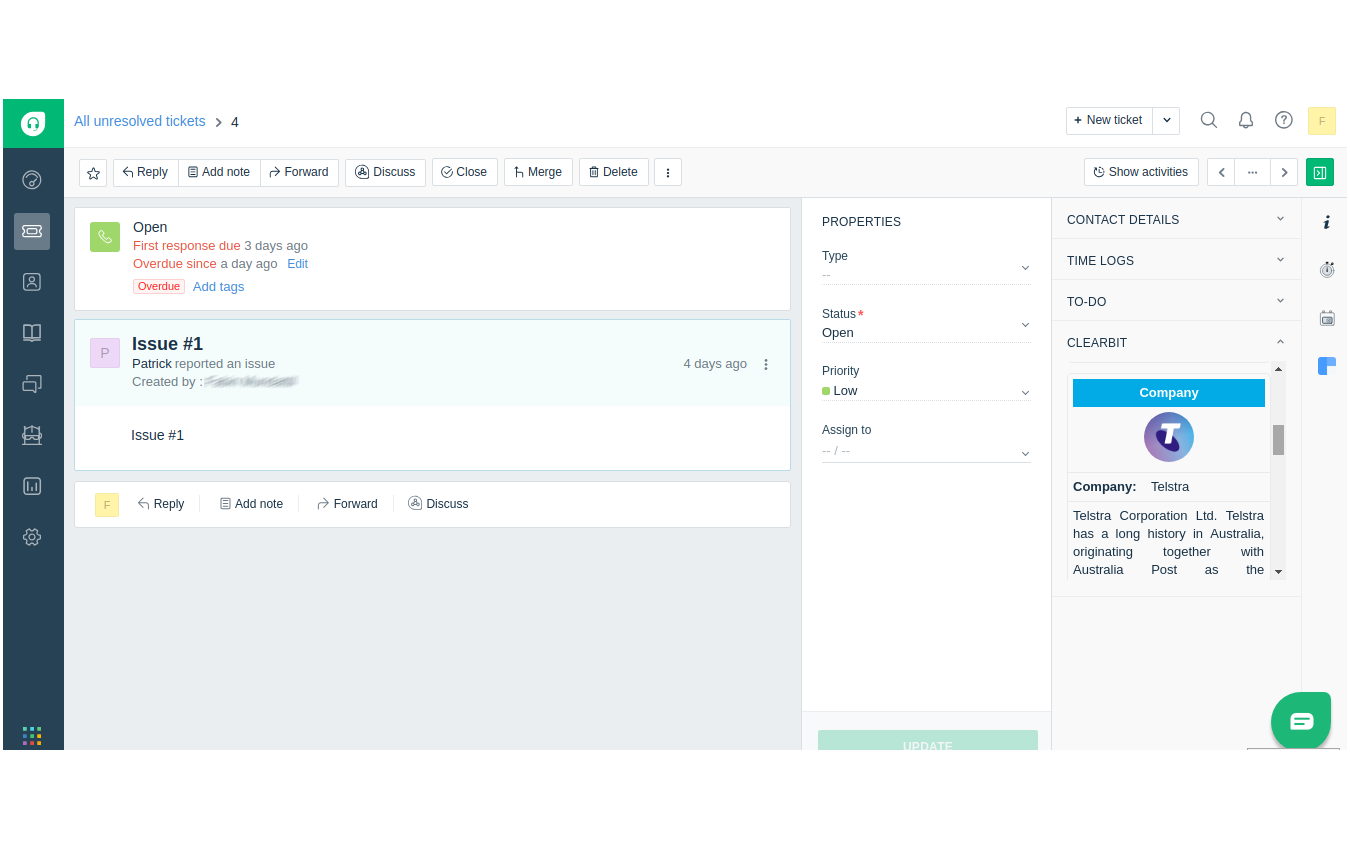
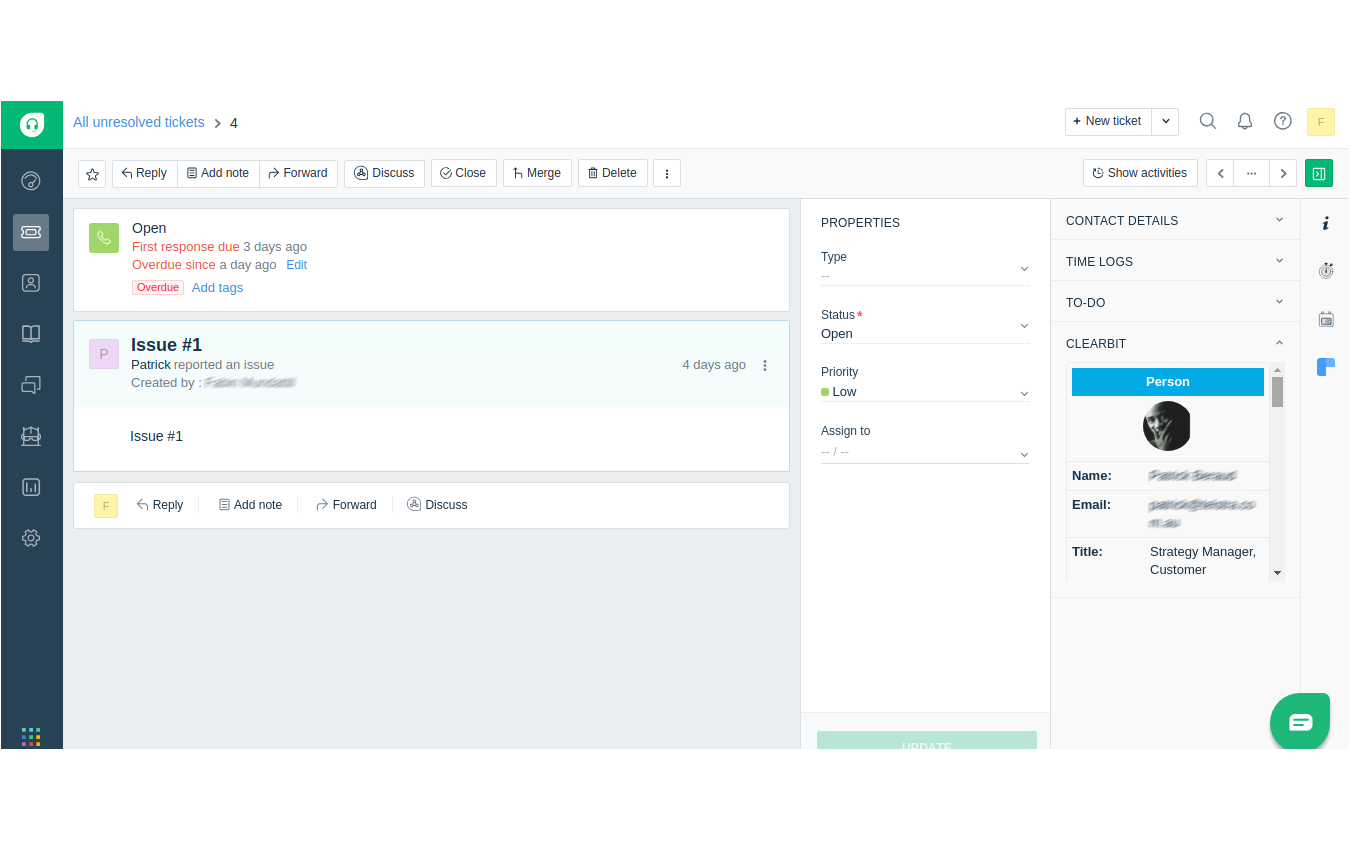
Clearbit integration in Freshdesk

The Clearbit Integration in Freshdesk is a custom-built app designed to seamlessly connect Clearbit’s rich customer and company data with Freshdesk’s ticketing system. Clearbit, a platform for discovering detailed company and individual profiles based on email addresses, provides valuable insights such as job titles, company size, revenue, and social profiles. This integration allows Freshdesk agents to automatically enrich customer tickets with this data, enabling a more personalized and efficient support experience.

Support agents often deal with customer issues and inquiries through Freshdesk tickets. By integrating Clearbit’s powerful data enrichment into this workflow, agents can instantly access detailed information about the customer or company associated with a ticket, allowing them to respond more quickly and effectively. This connection between Clearbit and Freshdesk ensures that agents have the context they need to provide superior service and, at the same time, opens opportunities for sales teams to track leads and potential sales opportunities from support interactions.

Key Features and Functionality:

  1. Seamless Data Enrichment:
    • Instant Customer Enrichment: With just the customer’s email address, the app automatically pulls in detailed information such as company name, industry, revenue, job titles, and social media profiles from Clearbit, directly into the Freshdesk ticket interface.
    • Automatic Data Syncing: The integration ensures that Clearbit data is synced in real-time, ensuring agents always have access to up-to-date and accurate customer profiles.
  2. Lead Identification and Qualification:
    • Turn Support Interactions into Sales Opportunities: The integration allows support agents to identify potential sales opportunities in customer tickets. When a ticket indicates interest in a product or service, the system can flag it as a potential lead for the sales team.
    • Customizable Lead Scoring: Businesses can set up automated rules that qualify tickets based on customer profiles or interactions (e.g., a high-value company or a request for product information), allowing the sales team to focus on high-potential leads.
  3. Automated Enrichment for Personalized Support:
    • Contextual Customer Information: With enriched data from Clearbit, agents can instantly access relevant customer details (such as company size, industry, and role) to offer a more tailored response, increasing the likelihood of resolving issues quickly and effectively.
    • Improved Communication: With insights into the customer’s business, industry, or social media presence, agents can craft more relevant responses and communicate with a deeper understanding of the customer’s needs.
  4. Lead-to-Support Alignment:
    • Unified Customer Journey: Support agents and sales teams can track the same customer profiles across systems, ensuring continuity of the customer journey from support to sales. Any ticket interaction that indicates a sales opportunity can be tagged and passed seamlessly to the sales team.
    • Lead Assignment: When a support interaction results in a sales opportunity, the Clearbit data can automatically be transferred to the sales team, with leads assigned based on predefined criteria like product interest or company size.
  5. Seamless User Interface:
    • Easy-to-Use Interface: The app integrates smoothly into the Freshdesk interface, allowing agents to view Clearbit’s enriched data without navigating away from the ticket screen. This reduces friction and keeps the workflow simple and efficient.
    • Minimal Setup: The app can be quickly installed and configured in Freshdesk with minimal technical expertise required. Admins can easily set up the integration, define lead-scoring rules, and begin leveraging enriched data within minutes.

Key Benefits of the Clearbit Integration:

  • Enhanced Support Interactions:
    By having access to detailed company and individual profiles, support agents can provide more personalized and informed responses. This leads to quicker resolutions and a more positive customer experience.
  • Increased Lead Conversion:
    Support agents can easily identify high-potential leads, passing qualified prospects to the sales team for follow-up. This seamless transition between support and sales boosts the chances of converting a support ticket into a sales opportunity.
  • Time and Effort Savings:
    The automated enrichment of customer data eliminates the need for agents to manually research customers, saving valuable time and ensuring that every customer interaction is based on the most up-to-date information.
  • Improved Collaboration Between Support and Sales:
    The integration creates a shared pool of customer data that is accessible to both the support and sales teams. This alignment ensures that no lead is missed, and sales reps can follow up on the most relevant opportunities.
  • Better Customer Insights:
    The Clearbit data provides a deeper understanding of each customer’s background, allowing agents to tailor their support and sales strategies accordingly. This results in more meaningful interactions and a better overall customer experience.
  • Reduced Manual Effort:
    By automatically pulling in customer data and syncing information across systems, the app reduces the need for manual data entry, helping businesses maintain accurate and consistent customer records.
Screenshots

Freshchat Integration to website

The Freshchat Integration to Website is a seamless integration designed to enhance customer communication by embedding Freshchat’s real-time messaging service directly into a WordPress website. Freshchat is a powerful live chat and messaging platform that enables businesses to engage with visitors in real-time, answer questions, and provide instant support. By integrating Freshchat into the website, businesses can improve customer engagement, boost conversion rates, and offer immediate assistance, enhancing the overall user experience.

This integration allows website visitors to easily interact with customer support or sales teams without leaving the page. Whether customers have pre-purchase questions, need post-purchase support, or simply want more information, Freshchat enables businesses to respond instantly and build stronger relationships with their users.

Screenshots

Freshdesk integration into wordpress

The Freshdesk Integration into WordPress is a custom-built solution designed to enhance customer support by embedding Freshdesk’s powerful ticketing system directly into a WordPress website. This integration allows customers to seamlessly open support tickets directly from the website, providing them with an efficient and organized way to communicate issues, inquiries, or requests without having to leave the site or search for support contact details.

Freshdesk, a widely-used cloud-based helpdesk platform, is known for its intuitive ticket management system, robust automation features, and seamless communication tools. By integrating Freshdesk into a WordPress site, businesses can provide a consistent, centralized platform for customer support while maintaining a smooth user experience on their website. This solution not only streamlines the support process but also helps businesses respond more effectively to customer queries and resolve issues in a timely manner.

2025-11-04T05:40:46+00:00Categories: Integrations, Plugin Development|Tags: , , |

KMS Lighthouse integration with Freskdesk freshsales and freshservice

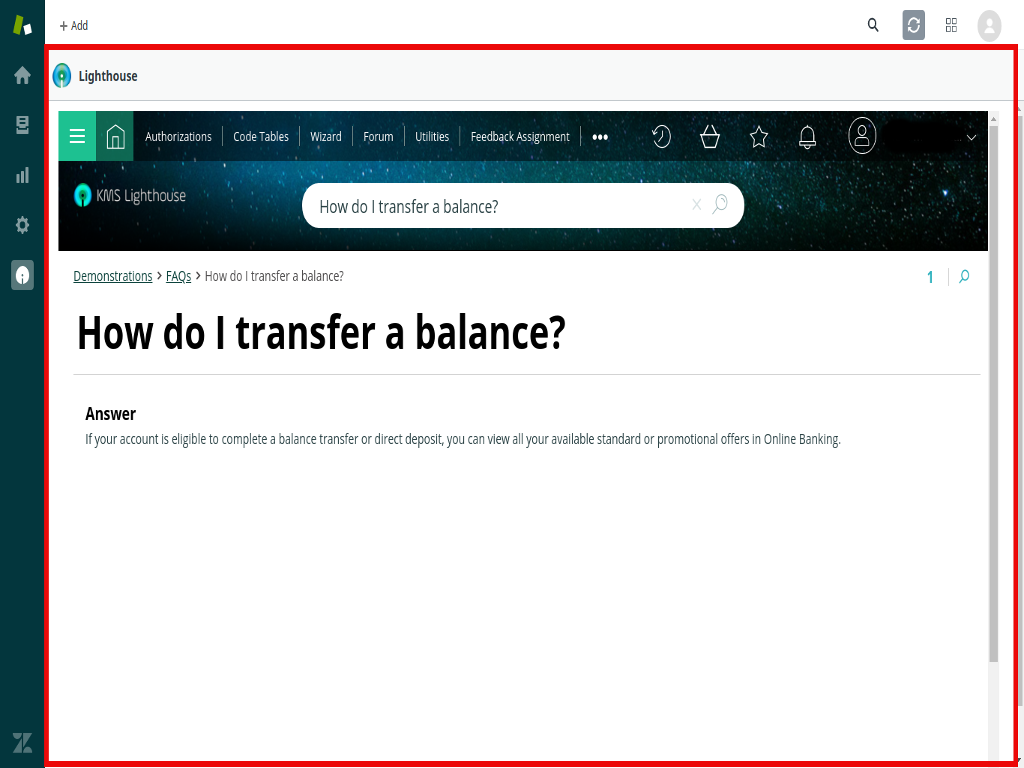
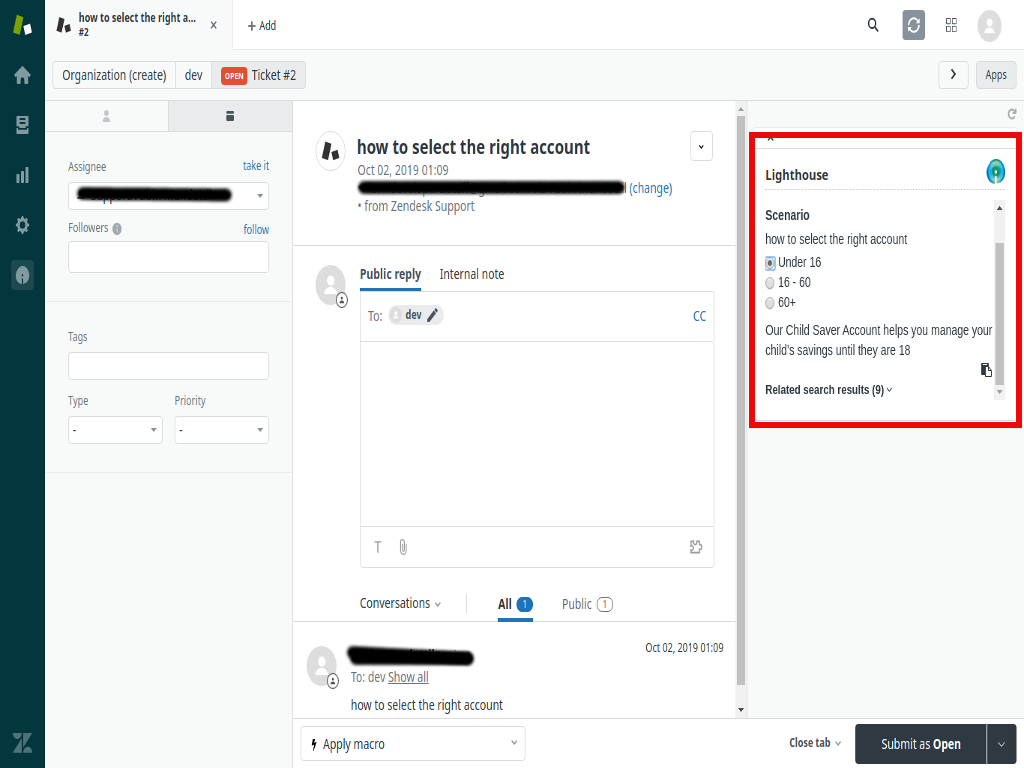
The KMS Lighthouse integration with Freshdesk, Freshsales, and Freshservice brings next-generation knowledge management directly to the heart of customer service, sales, and IT service operations. KMS Lighthouse is a leading provider of knowledge management solutions, offering a robust platform that enhances the way organizations provide information and support to customers and employees. By integrating KMS Lighthouse with Freshdesk, Freshsales, and Freshservice, businesses are able to unlock real-time access to accurate, consistent, and up-to-date knowledge, empowering both agents and customers to make more informed decisions.

The Lighthouse platform’s powerful search functionality and user-friendly interface deliver a seamless experience across multiple touchpoints, making it easier for agents to resolve customer issues faster and more efficiently. The integration streamlines workflows, enhances self-service options, and ensures that all customer interactions — whether through support tickets, sales inquiries, or IT service management — are supported with the right information at the right time.

Key Features and Functionality:

  1. Unified Knowledge Access Across All Platforms:
    • Centralized Knowledge Repository: KMS Lighthouse aggregates knowledge from various sources into a centralized repository. This integration ensures that agents, sales reps, and IT service teams have consistent access to relevant articles, FAQs, troubleshooting guides, and best practices directly within Freshdesk, Freshsales, and Freshservice.
    • Real-Time Search: The robust search functionality of Lighthouse allows agents to quickly find the information they need within the platforms. Whether resolving a customer support ticket, providing pre-sales assistance, or managing an IT incident, agents can pull up relevant knowledge in real-time without leaving the Freshdesk, Freshsales, or Freshservice interfaces.
  2. Faster Ticket Resolution and Sales Engagement:
    • Contextual Knowledge for Support Agents: When a customer submits a ticket through Freshdesk, agents are automatically provided with contextually relevant knowledge articles from Lighthouse that are directly related to the customer’s issue. This helps agents resolve tickets faster by offering suggested solutions, troubleshooting steps, or internal guidelines that they can share with the customer.
    • Sales Enablement: For sales teams using Freshsales, the integration provides easy access to product documentation, pricing guides, case studies, and other sales collateral stored in the Lighthouse knowledge base. Sales reps can quickly pull up the most relevant information to assist in customer interactions, improve lead conversions, and close sales deals faster.
  3. Knowledge Base Integration with IT Service Management:
    • Optimized IT Support with Freshservice: For IT service teams using Freshservice, Lighthouse ensures that relevant IT knowledge articles and solutions are easily accessible during the resolution of service requests or incidents. Agents can view troubleshooting guides, service manuals, and predefined workflows directly from Freshservice to provide faster, more accurate responses to internal or external stakeholders.
    • Automated Knowledge Suggestions for IT Tickets: When a new incident is logged in Freshservice, Lighthouse can suggest relevant knowledge articles or resolutions based on the issue reported. This feature helps reduce resolution times and improves the accuracy of solutions provided.
  4. Streamlined Workflows and Collaboration:
    • Knowledge Sharing Across Teams: With the integration of Lighthouse across Freshdesk, Freshsales, and Freshservice, internal knowledge sharing becomes effortless. Support teams can share insights and solutions with sales and IT service teams, ensuring that everyone is equipped with the latest information and best practices.
    • Real-Time Knowledge Updates: When the knowledge base is updated within Lighthouse, the changes are immediately reflected across Freshdesk, Freshsales, and Freshservice. This ensures that all teams are working with the most current and accurate information at all times, whether they are addressing a support ticket, engaging with a potential lead, or resolving an IT incident.

Key Benefits of KMS Lighthouse Integration with Freshdesk, Freshsales, and Freshservice:

Improved Support Efficiency:

By providing agents with quick access to the most relevant knowledge during ticket handling, this integration speeds up response times and enhances the quality of support provided. This results in higher customer satisfaction and lower ticket resolution times.

Increased Sales Effectiveness:

Sales reps using Freshsales benefit from instant access to product information, case studies, and other sales collateral stored in Lighthouse, helping them engage leads with more accurate and timely information. This improves the chances of converting leads into customers.

Consistent Knowledge Across All Teams:

Whether it’s support, sales, or IT service, the integration ensures that all teams have access to the same accurate, up-to-date knowledge. This consistency improves communication, collaboration, and the overall customer experience.

Faster Issue Resolution:

With contextually relevant knowledge instantly available to agents, tickets in Freshdesk and incidents in Freshservice can be resolved more quickly, which enhances overall operational efficiency and reduces customer waiting time.

Scalable Knowledge Management:

As your business grows, the Lighthouse integration allows you to scale your knowledge management processes across all platforms. You can easily expand your knowledge base, incorporate new information, and adapt to changing customer needs without disrupting existing workflows.

Enhanced Decision-Making with Analytics:

By using insights derived from knowledge base usage and performance, businesses can continuously improve their customer service, sales, and IT support operations. These analytics help identify knowledge gaps, customer pain points, and areas for improvement in the overall customer experience.

Streamlined Workflow Automation:

The integration automates many aspects of knowledge management, such as suggesting relevant articles or solutions, routing tickets, and updating knowledge content across platforms. This reduces manual effort and allows teams to focus on higher-priority tasks.

Magento Online Store for Global networking solution

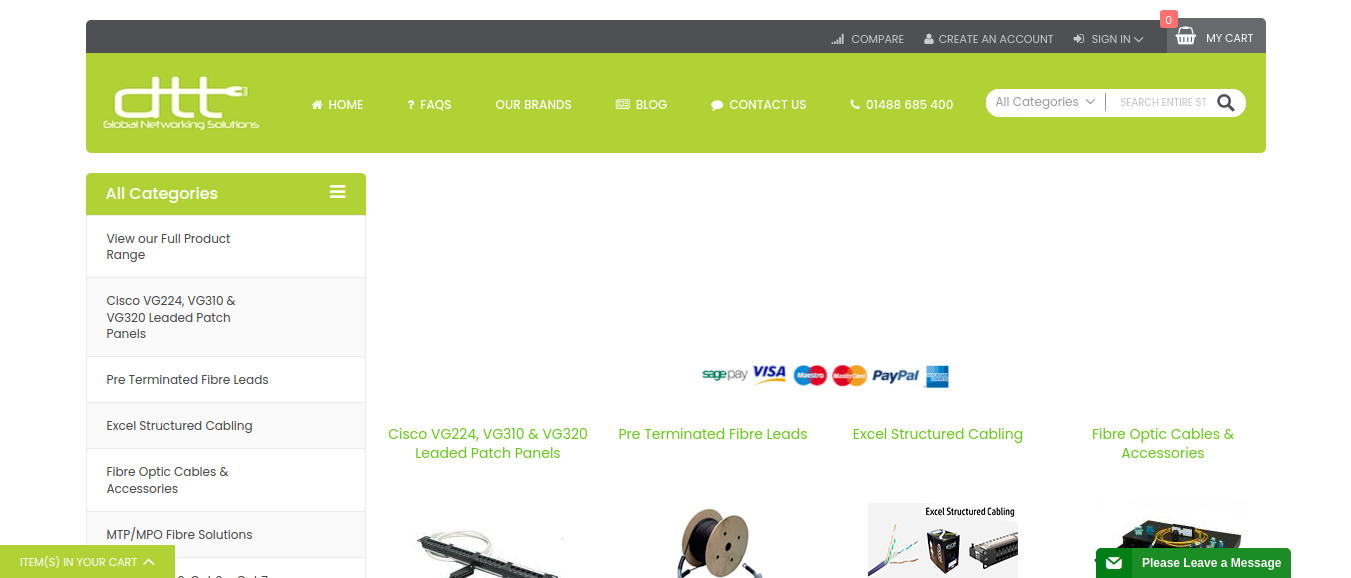
The Global Networking Solution website was developed to provide a comprehensive platform for businesses and individuals seeking advanced networking solutions. The project involved a major overhaul of the company’s existing Magento 1 website, including a full theme update and migration to Magento 2 to improve performance, security, and scalability. Additionally, ongoing maintenance and future updates were planned to ensure that the website remained up-to-date with the latest features, technologies, and security patches.

The website serves as the digital hub for showcasing the company’s services, products, and industry expertise in global networking. The goal was to enhance user experience, streamline navigation, and improve site performance while ensuring that the platform could easily scale as the business grew. The development involved working with a combination of HTML, CSS, JavaScript, PHP, and Magento technologies to meet the client’s vision and business objectives.

Key Features and Functionality:

  1. Magento 1 to Magento 2 Migration:
    • Smooth Transition: The migration from Magento 1 to Magento 2 was a critical aspect of the project. Magento 2 offers enhanced performance, better security, and more powerful features. The migration ensured that the client would benefit from the latest platform capabilities, including improved site speed, easier management, and a more robust back-end system.
    • Data Migration: We carefully handled the migration of all essential data (products, customer information, orders, and analytics) to Magento 2, ensuring no data loss or disruption in the site’s operation.
    • Upgraded Functionality: Magento 2 provides numerous enhancements, such as improved inventory management, better mobile responsiveness, a more intuitive admin interface, and better integration capabilities with third-party tools. These improvements were implemented into the site to create a better user and admin experience.
  2. Magento Theme Customization:
    • Tailored Design: The project involved updating and modifying the existing Magento theme to match the client’s specific branding and functional requirements. The goal was to ensure that the website not only reflected the company’s identity but also provided a seamless user experience for customers browsing the global networking solutions.
    • Responsive Design: The updated theme was made fully responsive, ensuring that the website is accessible and functional across all devices and screen sizes, from desktops to mobile phones.
    • Modern User Interface: We revamped the website’s visual design to make it more modern, clean, and intuitive. New design elements, navigation enhancements, and an improved layout were incorporated to make it easier for users to explore the site and find relevant information.
  3. Customization of User Experience (UX):
    • Enhanced Navigation: We restructured the navigation menu and added key categories to improve how users could explore products and services. This helped customers quickly locate the information they needed, reducing friction and improving the overall browsing experience.
    • Product Showcasing: Networking products, solutions, and services were showcased more effectively using custom Magento product templates. High-quality images, detailed descriptions, and specifications were included to help users make informed decisions.
    • Interactive Features: Interactive elements like hover effects, dynamic content, and smooth animations were integrated using JavaScript to improve engagement and make the website more visually appealing.
  4. Backend Development and PHP Integration:
    • Custom PHP Modules: To meet the specific needs of the client, custom PHP modules were developed to extend the functionality of the website. These modules integrated with the core Magento system, allowing for the customization of key features such as product catalogs, pricing models, and payment methods.
    • Payment Gateway Integration: Multiple payment methods were integrated into the website, allowing for secure online transactions. Integration with third-party payment gateways was configured to ensure smooth and seamless checkout experiences for customers across different regions.
    • Scalability: The backend was designed to be highly scalable, ensuring that the website could handle increased traffic and more product offerings as the business expanded.
  5. SEO Optimization and Site Speed Improvements:
    • SEO Best Practices: We implemented various SEO strategies to ensure that the website would rank well on search engines like Google. This included keyword optimization, updating metadata, improving URL structures, and ensuring all content was SEO-friendly.
    • Speed Optimization: Magento 2 offers significant improvements in performance, but additional optimizations were made to enhance site speed further. This included image compression, caching mechanisms, and script minification to reduce load times and provide a smoother user experience.
    • Mobile Optimization: The website was optimized for mobile performance, ensuring that users on mobile devices would experience fast loading times and smooth navigation.

Technologies Used:

  • HTML, CSS, JavaScript: For front-end development and theme customization.
  • PHP: For backend development and custom module creation.
  • MySQL: Database management for storing product, customer, and transaction data.
  • SEO Tools: For optimizing the site’s search engine rankings and improving visibility.
  • Payment Gateway Integration: To facilitate secure online transactions.

Key Benefits of the Project:

Improved Performance and Scalability:

The migration to Magento 2 greatly improved the website’s speed, performance, and scalability. The upgraded architecture ensures that the website can handle more traffic and product offerings as the business grows.

Modernized User Experience:

The updated design and improved navigation make the site easier to use and more visually appealing, which leads to a better overall customer experience.

Better Security and Compliance:

With enhanced security measures, including SSL encryption and regular security patch updates, the website is better protected against data breaches and attacks.

SEO and Mobile Optimization:

The focus on SEO and mobile optimization ensures that the website performs well in search engine rankings and provides a smooth experience for mobile users.

Easy Content Management:

The integration of a user-friendly CMS allows the client’s team to easily manage the website’s content and make updates without requiring specialized technical skills.

Screenshots

2025-11-04T11:40:44+00:00Categories: Business Website|Tags: , , , , |

Magento Online Store For Spare Parts Provider

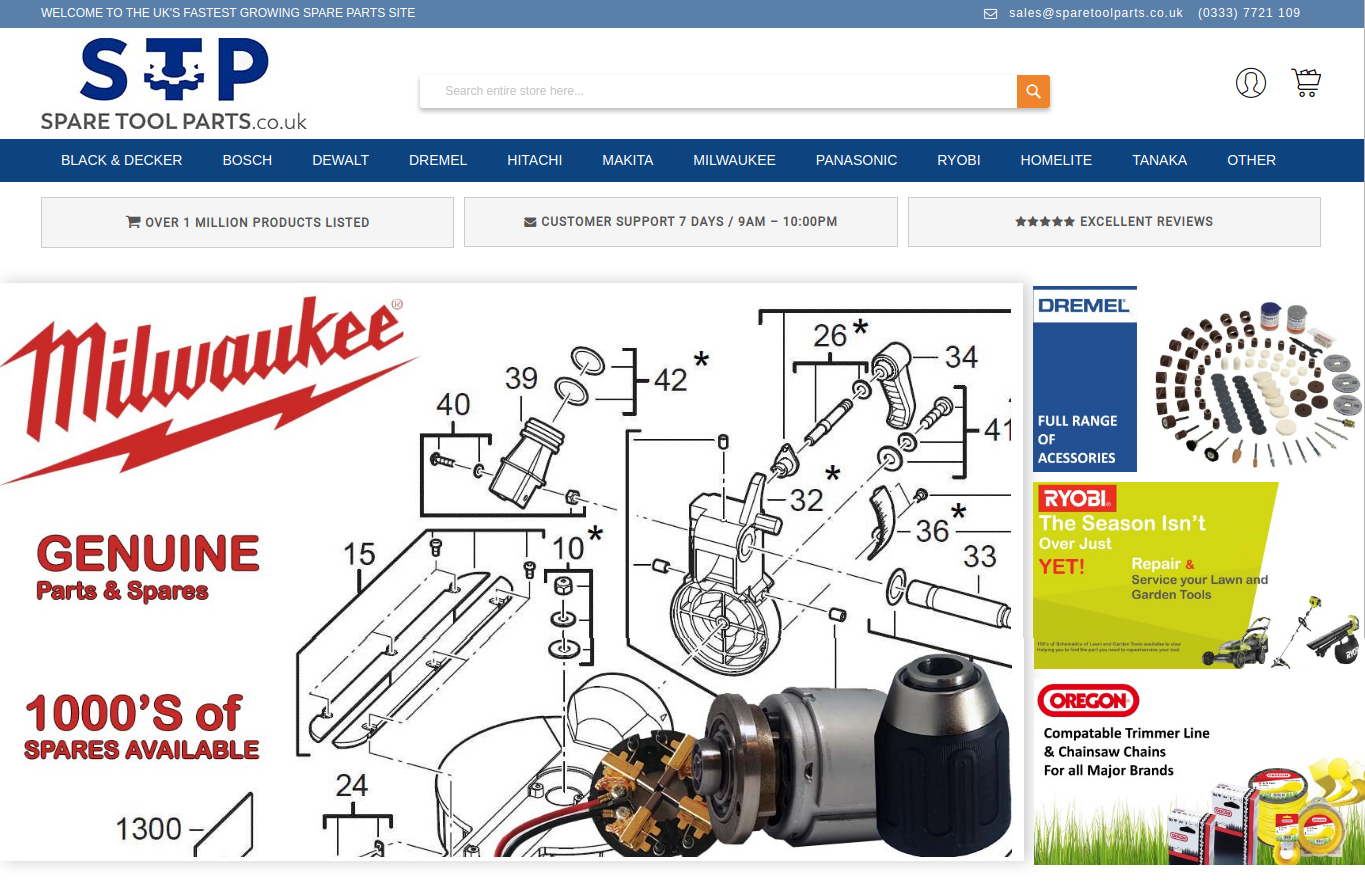
The Spare Parts Provider website is a robust e-commerce platform built on Magento designed to facilitate the online sale of automotive and industrial spare parts. The primary objective of the project was to migrate the website from Magento 2.1.x to Magento 2.3.x to ensure that the platform is equipped with the latest features, security updates, and performance enhancements. Along with the Magento version upgrade, we also updated essential modules and customized various aspects of the site to enhance the user experience and ensure compatibility with the latest Magento ecosystem.

In addition to the version migration, we worked on front-end and back-end development using HTML, CSS, JavaScript, and PHP to meet the specific requirements of the client. The website was designed to improve the customer shopping experience with advanced search functionalities, clear product categorization, and an intuitive interface. The result was a feature-rich, high-performance site that helped the client stay competitive in the spare parts e-commerce market.

Key Features and Functionality:

  1. Magento Version Migration (2.1.x to 2.3.x):
    • Seamless Transition: One of the core objectives was to migrate the website from Magento 2.1.x to Magento 2.3.x, which included upgrading all features, functionalities, and plugins to the latest version.
    • Data Migration: All critical data, including product catalogs, customer details, order history, and transactional data, were seamlessly migrated from Magento 2.1.x to 2.3.x without any data loss or disruption. We used Magento Data Migration Tool to ensure smooth data transfer, avoiding any potential issues with product listings or customer accounts.
    • Extension and Module Compatibility: All installed modules were updated to be fully compatible with Magento 2.3.x, ensuring continued functionality across the platform. This included updating third-party extensions, such as payment gateways, shipping integrations, and SEO modules, to ensure they worked seamlessly with the new version of Magento.
  2. Module Updates and Customizations:
    • Upgraded Functionalities: After upgrading the Magento version, we focused on updating and customizing the modules used on the website. This ensured that all functionality, such as the product catalog, checkout, and payment systems, was fully compatible with the new version and remained up-to-date.
    • Custom Module Development: We developed custom modules to meet specific needs such as advanced search filters for spare parts, inventory management, and customer notifications for order status updates.
    • Performance Optimization: We optimized the website’s modules for better speed and efficiency, ensuring that users could easily browse and make purchases without delays. This included improvements to the product search functionality, ensuring fast load times for product pages even with a large inventory.
  3. Front-End Development:
    • Responsive Design: The front-end of the website was designed with a mobile-first approach. We ensured that the website was fully responsive across all devices, from desktop to tablets and mobile phones. This was particularly important given that many customers in the spare parts industry may access the site from mobile devices to place orders or look up parts while on the go.
    • Product Catalog and Search: A key feature of the site is the product catalog, which includes detailed listings of spare parts, along with filters for customers to easily search for the parts they need based on parameters like part number, vehicle model, year, manufacturer, and more. We used HTML, CSS, and JavaScript to design a clean, intuitive product display that makes it easy for customers to find the products they need quickly.
    • Interactive Product Pages: Each product page was customized with rich media (high-quality images, videos, and technical specifications), and integrated features such as customer reviews and Q&A sections, allowing customers to gather all necessary information before making a purchase.
  4. Back-End Development:
    • PHP and Magento Customization: We used PHP to customize Magento’s back-end functionality. This included modifying the checkout process, implementing additional payment gateways, and creating custom order management workflows to suit the specific needs of the spare parts business.
    • Inventory Management: We integrated advanced inventory management functionality that allows the client to track and manage spare parts inventory across multiple warehouses. The system was built to support real-time updates and product availability, minimizing stockouts and overselling.
    • Automated Shipping and Order Processing: The back-end system was configured to automate order processing and shipping label generation based on real-time stock levels. Integration with third-party logistics providers ensured seamless fulfillment and tracking for customers.
  5. Enhanced User Experience (UX) Design:
    • Simplified Checkout Process: We focused on streamlining the checkout process to reduce cart abandonment. This included implementing features like guest checkout, saved carts, and easy payment integration. The goal was to make it as easy as possible for customers to complete their purchases with minimal friction.
    • Customer Account Management: Customers were provided with personalized dashboards where they could track order history, save favorite parts for future orders, and receive personalized recommendations based on their purchase history.
    • Real-Time Shipping Rates: Real-time shipping rate calculations were integrated, ensuring customers always knew exactly how much shipping would cost and could select their preferred shipping method.
  6. SEO and Performance Optimization:
    • SEO Best Practices: The website was optimized for SEO to ensure better search engine visibility. This included ensuring clean URL structures, meta tags, image alt tags, and optimized content for all spare parts listings.
    • Speed and Load Time Optimization: We used minification of CSS and JavaScript files, image optimization, and Magento’s built-in caching mechanisms to ensure that the website loaded quickly even with large inventories and high user traffic. Faster load times improve user experience and contribute positively to search engine rankings.
  7. Security and Compliance:
    • SSL Encryption: SSL certificates were implemented across the site to ensure that all data transmitted between customers and the website was securely encrypted. This is crucial for protecting sensitive customer information, especially during checkout.

Technologies Used:

  • Magento 2.3.x: Core platform for e-commerce functionality.
  • HTML, CSS, JavaScript: For front-end design, layout, and interactive features.
  • PHP: For back-end development and custom module creation.
  • MySQL: For database management of products, orders, and customers.
  • AJAX: For dynamic content loading and enhanced search features.
  • SEO Tools: For optimizing product pages and ensuring high search engine rankings.
  • Payment Gateway Integration: For secure online transactions.

Key Benefits of the Project:

Improved Site Performance:

The Magento 2.3.x migration brought significant improvements in speed and scalability, which ensures that the website can handle increased traffic and transactions without slowdowns.

Enhanced User Experience:

With features like advanced search, streamlined checkout, and personalized user accounts, the website provides a seamless and enjoyable experience for customers looking to purchase spare parts.

Simplified Inventory and Order Management:

The integration of automated inventory management and order processing ensures that the spare parts provider can easily track product availability and fulfill orders efficiently.

Stronger Security and Compliance:

With SSL encryption and PCI-DSS compliance, the website provides a secure environment for online transactions, building trust with customers and ensuring sensitive data is protected.

Better Search Engine Visibility:

The implementation of SEO best practices, along with optimized content and product listings, ensures that the website ranks well on search engines, helping to drive organic traffic to the site.

Scalability and Future-Proofing:

The upgrade to Magento 2.3.x ensures that the website is future-proof, capable of supporting new features, modules, and technologies as the business continues to grow.

Screenshots

2025-11-04T11:39:02+00:00Categories: Business Website|Tags: , , , |
Go to Top